
Managing Marketing Resources with MRM Software
Marketing teams today are being asked to do more with less. More campaigns. More channels. More stakeholders demanding faster turnaround. And in most organisations, the tools used to manage all of this — spreadsheets, shared inboxes, and ad hoc scheduling conversations — weren't designed for the job.
Marketing Resource Management (MRM) software exists to solve that problem. It gives marketing teams a centralised platform to plan capacity, allocate people, track how long work actually takes, and manage approvals — so campaigns run efficiently, workloads stay balanced, and nothing falls through the cracks.
This guide explores what MRM software does, the benefits it delivers, the problems it replaces, and the key features to look for when choosing a platform. It also explains how Simple Admation connects resource management to briefing, review and approval, so resourcing decisions are made with the full picture rather than half of it.
New to the category? Start with our guide to what marketing resource management is, or go straight to the Simple Admation MRM solution.
What Is Marketing Resource Management (MRM)?
Marketing Resource Management is the discipline of planning, allocating, and managing the resources a marketing team relies on — people, time, effort, tools, and creative assets.
An MRM platform brings these functions into one system, replacing disconnected spreadsheets and siloed tools with a live, shared view. At its core, MRM software helps marketing departments answer three questions:
- Do we have the capacity to take on this campaign?
- Are our people deployed on the right priorities?
- Is the work taking longer than we planned for, and if so, why?
MRM platforms differ significantly in emphasis. Some are built around enterprise marketing planning and budget allocation — deciding where spend goes. Others are built around the operational side — capacity, workload, briefing and approvals — getting the work produced once that decision is made. Knowing which problem is costing you more is the single most useful thing to establish before you start evaluating.
MRM is related to but distinct from marketing project management. Project management tracks individual campaigns. MRM looks across all of them at once, managing availability and utilisation.
The Six Core Components of MRM Software
1. Resource Planning and Capacity Management
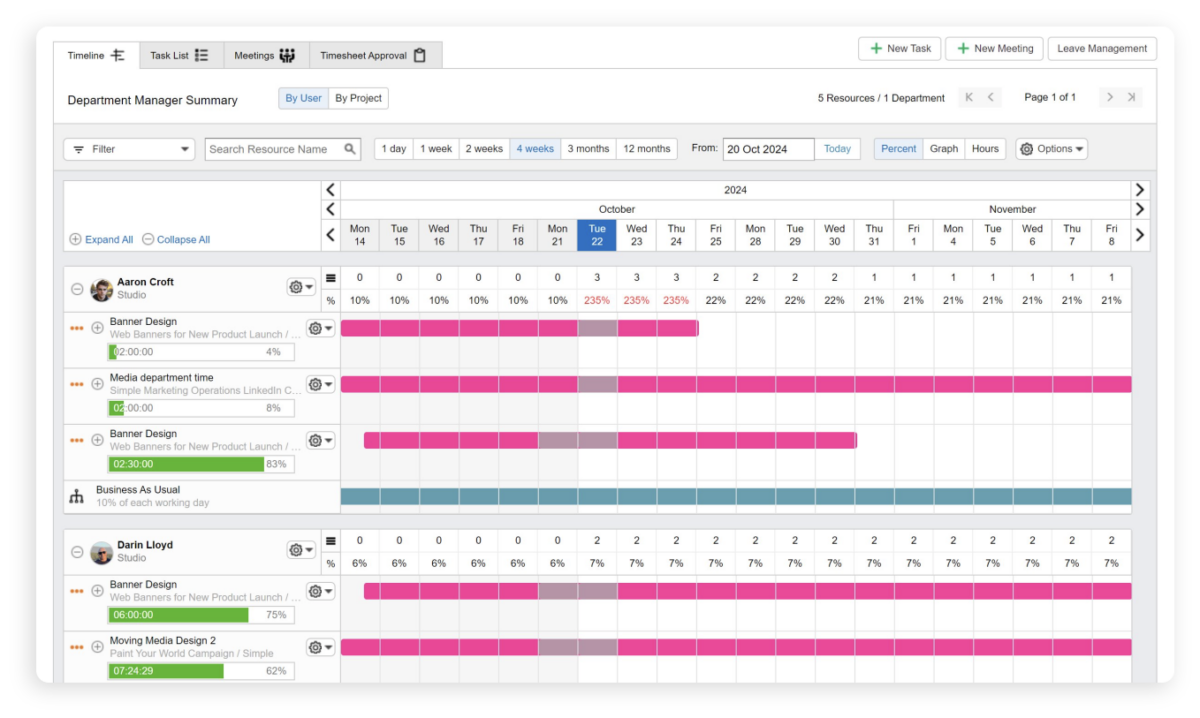
Effective resource management starts with visibility. MRM software gives managers a real-time view of who is available, what they’re working on, and how much capacity they have across the coming days, weeks, and months.
Simple Admation’s department dashboard displays each team member’s workload, upcoming tasks, and availability, giving managers the data they need to assign work confidently. Capacity notifications alert managers when a team member or skill set is approaching overload, making it possible to reallocate work before deadlines are missed.
See how Simple Admation handles approval workflows alongside resource planning
2. Task Management and Workflow Automation
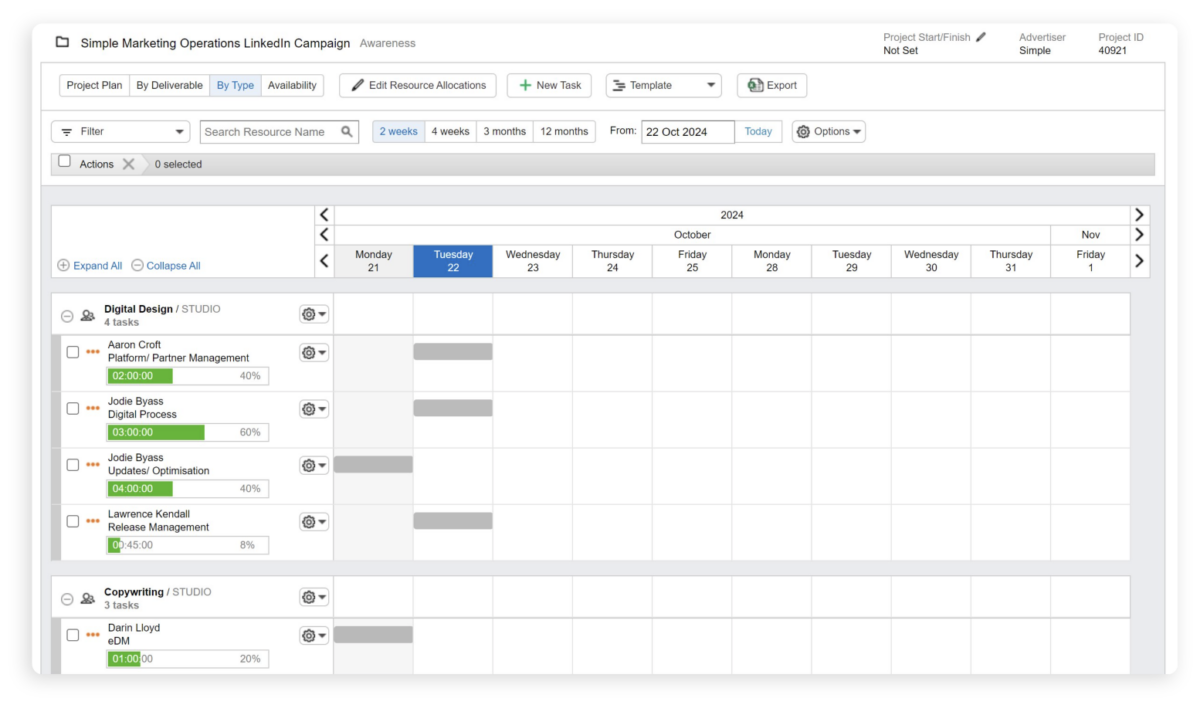
MRM software simplifies the creation, assignment, and tracking of marketing tasks. Instead of managing work through email threads or disconnected project tools, managers can create tasks with embedded briefs, deadlines, and required approvals — and assign them directly to available team members.
Automated workflows ensure tasks move through the correct stages in sequence. Simple Admation’s ‘Brief and Assign Task’ feature allows managers to view resource availability and allocate work in a few clicks, with automated reminders keeping team members accountable.
Learn about Simple Admation’s online brief feature
3. Effort Tracking and Time Data
Resource planning only works if you know what the work actually takes. Most marketing teams have no baseline for how long a piece of work should take, which means actual hours have nothing to be compared against.
Simple Admation’s project resource templates set an expected effort by project type — a video, a banner set, a flyer each carry an estimated time and the skills required to produce it. When a project of that type is created, the estimate comes with it. Built-in online timesheets then capture what was actually spent, separating billable from non-billable hours.
The variance between estimated and actual effort is what makes future planning accurate. Every completed project tests whether the estimate was right, and consistent overruns on one project type point at the process around it — briefing quality, or review cycles running longer than planned.
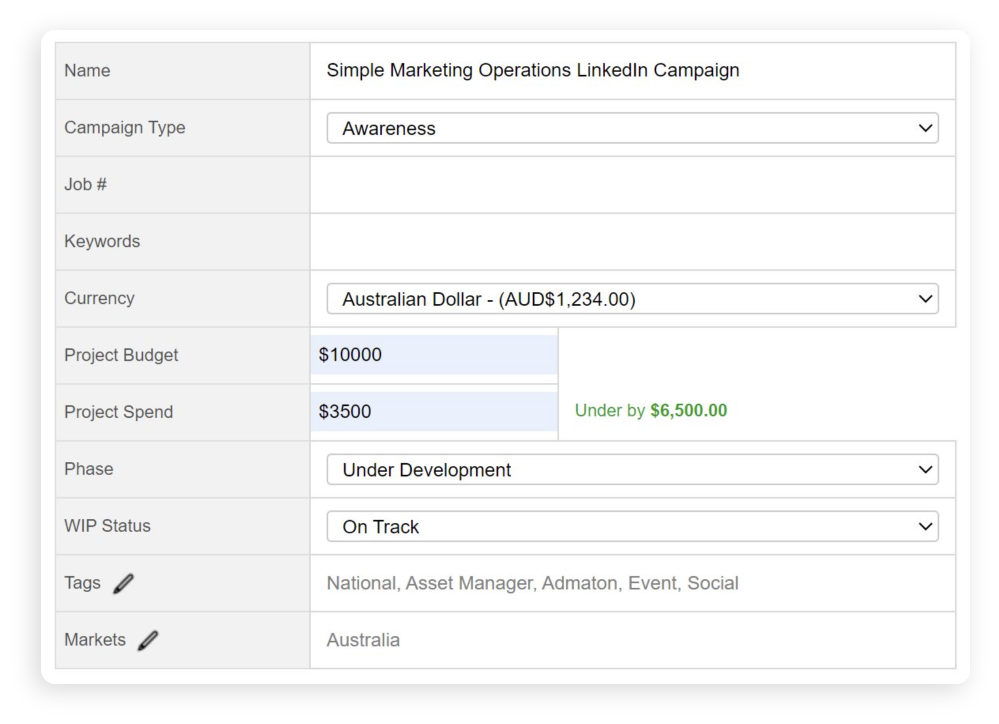
A budget figure can be recorded against a project for reference. Simple Admation tracks effort rather than financial spend: it does not reconcile invoices or manage marketing budgets.
4. Project and Campaign Management
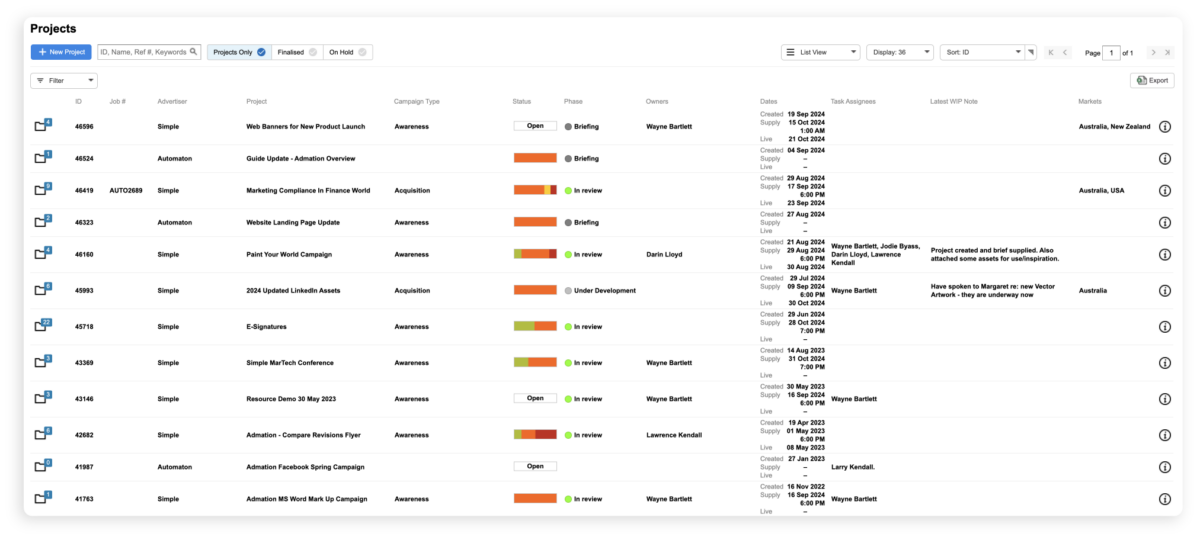
MRM platforms provide campaign management tools that help marketing teams plan, execute, and track the progress of multiple initiatives simultaneously. Simple Admation includes Gantt charts for timeline visualisation, Kanban boards for workflow management, and shared calendars for campaign scheduling.
Read more on marketing project management
5. Digital Asset Management
Marketing resources include the assets themselves — logos, images, videos, brand guidelines. Keeping them alongside project and resource data means teams always work from the current approved version rather than a file someone saved locally three months ago.
Simple Asset Manager is a standalone digital asset management product that works alongside Simple Admation, giving teams a central approved-asset library connected to the projects that produce and use them.

6. Reporting and Performance Analytics
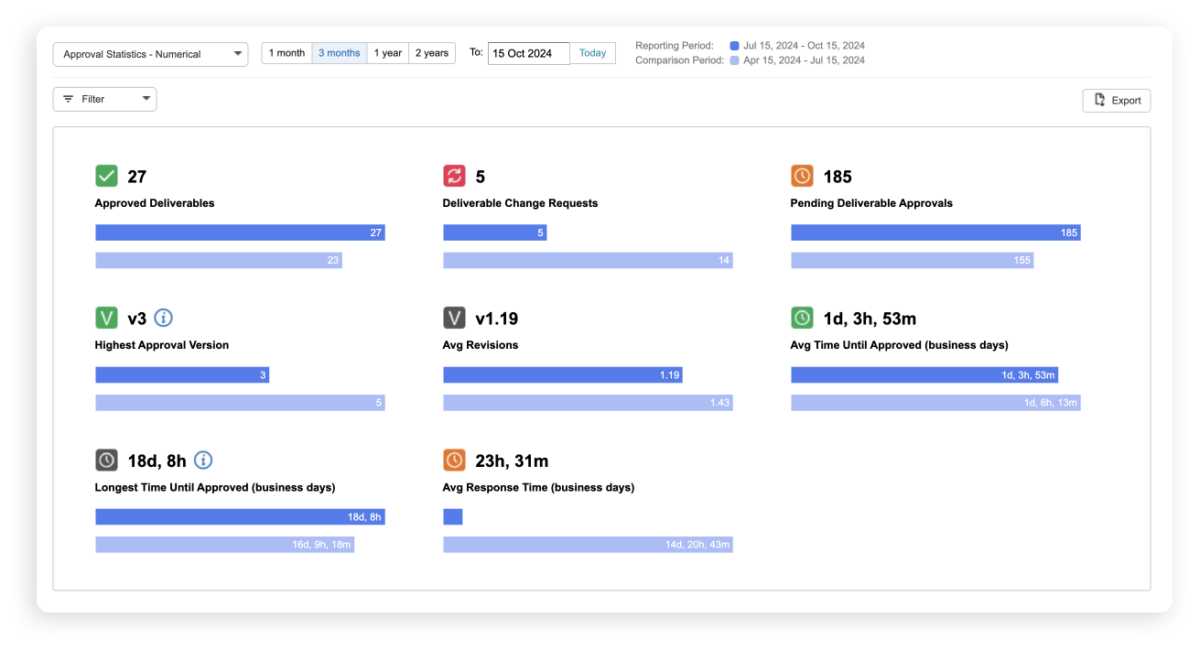
MRM software provides real-time insight into resource utilisation, delivery performance, and campaign outcomes. Simple Admation’s reporting tools let managers generate custom reports on team productivity, utilisation, and planned versus actual effort by project — data that supports ongoing optimisation and board-level reporting.
Explore Simple Admation’s WIP reporting
The Benefits of Marketing Resource Management Software
Improved Planning and Forecasting
With MRM software, marketing leaders can plan capacity weeks or months in advance, matching team availability to campaign schedules before problems arise. Resource templates enable teams to build standardised project structures that speed up kick-off, carry an expected effort for each project type, and reduce planning time for recurring campaigns.
Better Resource Utilisation
Without visibility into workloads, it’s common for some team members to be consistently overloaded while others sit underutilised. MRM software surfaces these imbalances in real time, allowing managers to rebalance workloads and improve overall team productivity.
Reduced Time Lost to Admin
Automating task assignment, reminders, approval routing, and reporting frees marketing teams from significant administrative overhead. Time that previously went into maintaining spreadsheets, chasing approvals, and coordinating schedules can instead go into strategic and creative work.
Stronger Compliance and Brand Governance
For teams operating in regulated industries — banking, insurance, health, retail — MRM software connected with approval workflows and audit trails provides the compliance oversight needed to operate confidently. Every campaign asset is tracked from brief to final sign-off, with a complete audit record available at any time.
Learn more about marketing compliance with Simple Admation
Increased Accountability
When tasks, deadlines, and responsibilities are captured in an MRM platform, accountability improves across the team. Everyone knows what they’re responsible for, when it’s due, and how it fits into the broader campaign — and managers have visibility to follow up when things are at risk.
Demonstrable Return on Effort
MRM reporting gives marketing leaders the data to show what the marketing function is producing and what it takes to produce it. Utilisation, planned versus actual effort, and delivery performance combine into a clear picture of where team capacity is going — and a credible basis for resourcing conversations with leadership.
Why Spreadsheets Fall Short for Resource Management
No Real-Time Visibility
Spreadsheets are static documents. They show the state of the world at the moment they were last updated — not right now. In fast-moving marketing environments, this lag creates confusion, duplicated effort, and poor decision-making.
Human Error is Inevitable
Manual data entry introduces risk at every step. A formula error, an incorrectly entered figure, or an out-of-date row can skew resource allocation, effort estimates, and project planning decisions. MRM software automates these processes, eliminating a significant source of risk.
No Integrated Approval Process
Spreadsheets can track the existence of an approval — but they can’t manage the approval process itself. Marketing teams that rely on spreadsheets for approval tracking end up chasing stakeholders through email, losing track of feedback versions, and risking non-compliant content going to market.
Version Control Chaos
In any team environment, spreadsheets multiply quickly. Multiple versions circulating simultaneously, with different team members editing different copies, is a near-universal experience — and a consistent source of error and frustration. MRM software replaces this with a single source of truth.
Limited Reporting
Generating meaningful reports from spreadsheet data requires time-consuming manual effort. MRM platforms generate these reports automatically, in real time, from live project data.
Key Features to Look for in MRM Software
Real-Time Capacity Dashboard
Immediate visibility into who has capacity, who is overloaded, and what skills are available — without manual updates.

Drag-and-Drop Task Assignment
Reduces friction in reallocation, making it fast for managers to respond to changing priorities.

Integrated Approval Workflows
Connects resource planning with structured review and sign-off processes, especially critical for regulated industries.

Planned vs Actual Effort
Shows whether work is taking the time you estimated — the basis for accurate forecasting.

Time Tracking and Timesheets
Accurate time data is essential for understanding true project costs and improving future capacity planning.

Project Resource Templates
Set expected effort and required skills by project type, so estimates are built in rather than guessed.

Reporting and Analytics
Automated reporting on utilisation, effort variance, and delivery performance — without manual spreadsheet effort.

Audit Trails
A complete record of approvals, feedback, and changes — essential for compliance in regulated industries.

Scalability
The platform should grow with your team and your campaign complexity over time.

Why Resourcing Belongs in the Same System as Approvals
The most effective MRM implementations don’t treat resource management as a standalone function. They connect it to the work it depends on — briefing, review, approval, and delivery.
This matters more than it sounds. If resourcing sits in one system and approvals in another, you can see that a project overran, but not why. The resourcing tool knows a banner set took eleven hours instead of six. It doesn’t know the work went through five review rounds after an ambiguous brief. The approval tool holds those rounds but not the effort they added. Neither carries the full history, so the diagnosis rarely happens — and next quarter’s estimate is no better than this one’s.
Simple Admation brings these into one project record:
- Marketing Project Management — campaign planning, Gantt charts, Kanban boards
- Marketing Approval Workflows — structured review and sign-off
- Online Proofing — markup and annotation on creative assets
- Marketing Compliance — audit trails and brand governance
- Resource Management — capacity, allocation, and effort tracking
The practical result: estimated effort, actual hours, and approval history can be read together. Managers can see not only where work exceeded its estimate, but what may have contributed.
Choosing the Right MRM Platform
When evaluating MRM software, consider these factors:
- Does it provide real-time visibility into resource availability and workload?
- Does it set expected effort by project type, or only record hours after the fact?
- Does it integrate with your approval and compliance processes, or sit separately from them?
- Can it connect with the other tools in your marketing technology stack?
- Is it scalable as your team and campaign volume grow?
- Does the vendor have experience with organisations of your size and complexity?
Simple Admation is trusted by major Australian brands including Bupa, Woolworths, Bank Australia, RACV, Tourism Australia, and The Just Group — organisations with complex, high-volume marketing operations that require robust resource management, approval workflows, and compliance controls.
Conclusion
Managing marketing resources effectively is one of the most significant levers available to marketing operations leaders. The right MRM platform replaces manual admin with automation, guesswork with data, and siloed tools with a connected view of what the team is producing and what it takes.
Simple Admation is built for in-house marketing teams and agencies managing high volumes of complex campaigns — where resourcing decisions depend on knowing what happened in briefing, review and approval, not just what the schedule said.

Frequently Asked Questions
What are the signs that a marketing team needs MRM software?
Most marketing teams reach a tipping point where manual systems can no longer keep up. Common signs that MRM software is needed include managers regularly not knowing who has capacity until a campaign is already overdue, campaign deadlines frequently missed because workload wasn’t reviewed before kick-off, no one being able to say whether a project took longer than it should have because there is no estimate to compare against, approval processes running through email with no reliable feedback trail, team members consistently overloaded while others are underutilised, and marketing leaders unable to answer basic questions about utilisation without pulling data from multiple places.
If three or more of these describe your team’s current situation, MRM software will deliver immediate, measurable improvement. Explore Simple Admation’s MRM solution.
How does MRM software connect with marketing approval workflows?
Resource management and approval workflows are two sides of the same operational challenge. Resource management ensures the right people are available to produce campaign assets. Approval workflows ensure those assets are reviewed and signed off before they go to market. When the two systems are separate, teams lose time switching between platforms, approval status is invisible to resource managers, and campaign delays caused by bottlenecked approvals don’t show up in workload data.
Simple Admation integrates resource management directly with its approval workflow module. When an asset moves into the review stage, the resource view updates automatically — managers can see where approvals are causing delays and whether the team has capacity to respond to revision requests. Approval routing, feedback capture, and compliance sign-off all happen in the same system as task assignment and capacity planning. See Simple Admation’s approval workflows and online proofing tools.
How does MRM software support marketing teams in regulated industries?
Regulated and high-volume industries — banking, insurance, financial services, health, and retail — have requirements that go beyond standard resource planning. Every external-facing asset needs to pass through a structured review process involving legal, compliance, and brand approvals. Without a system that connects resource management to compliance workflows, these reviews happen through email chains that leave no audit trail, and campaign assets can go to market without the correct sign-offs in place.
Retail marketing teams face a related challenge at scale: high volumes of recurring promotional assets, each needing brand and compliance sign-off within tight trading windows. Resource planning and approval capacity have to be considered together, because a promotion that clears production but stalls in review still misses the trading date.
Simple Admation addresses this by connecting resource management with configurable approval workflows and automatic audit trails. Every action on every asset — who reviewed it, what feedback was given, when it was approved, which version was signed off — is captured in the system. See Simple Admation’s marketing compliance capabilities and MRM for banking and finance teams.
What does MRM implementation typically involve, and how long does it take?
MRM implementation has two dimensions: technical configuration and team adoption. On the technical side, this means configuring the platform to match your workflows — setting up department structures, resource templates, effort estimates by project type, approval routing rules, and reporting dashboards. On the adoption side, it means training managers and team members to use the system consistently so that data remains accurate and planning decisions are based on real workload information.
For most teams, Simple Admation is fully operational within a few weeks. The implementation process is guided by the Simple team, who configure the platform to each client’s specific requirements rather than applying a generic setup. Teams that see the fastest results typically start with capacity planning and task assignment before expanding into timesheet capture, effort reporting, and compliance workflows.
The most common implementation risk is partial adoption: when some team members use the system and others don’t, the workload data becomes unreliable. Establishing clear expectations about task logging and time capture at the outset is the single most important factor in a successful rollout. Book a discovery call to discuss implementation.
How do you measure whether MRM software is working?
MRM effectiveness should be measured against the problems it was implemented to solve. The most useful metrics to track in the first three to six months are resource utilisation rate (the percentage of available team hours allocated to project work versus unplanned or reactive tasks), capacity forecast accuracy (how closely planned workload at the start of a period matches actual workload at the end), effort variance (the difference between estimated and actual hours by project type), approval cycle time (how long assets spend in review from submission to final sign-off), and on-time delivery rate (the percentage of campaigns and tasks completed by their original deadline).
Most teams see improvement across all five metrics within the first quarter of consistent use. Simple Admation generates these metrics automatically from live project data — see Simple Admation’s reporting and WIP tools.
How do I build a business case for MRM software?
A credible MRM business case is built on quantified current-state costs, not projected future benefits. Start by measuring what inefficiency is actually costing your team today: how many hours per week are spent on manual resource tracking, spreadsheet updates, and scheduling conversations; how many campaigns miss their original deadline and what is the downstream cost of those delays; how much rework is generated by poor briefing or miscommunication at the task assignment stage; and whether the team has experienced any compliance incidents where assets went to market without correct approval.
Once you have these numbers, map them to the specific improvements MRM software delivers: time saved on admin, reduction in rework, fewer missed deadlines, and reduced compliance risk. Read more on measuring what your team’s time actually costs for a practical starting framework.
Related Resources
Marketing Project Management Software
How Admation manages the complete campaign lifecycle - planning, execution, approvals, and reporting - for marketing teams. Learn more about Project Management

Marketing Approval Workflow Software
How Admation automates multi-stage approval routing and sign-off governance. Learn more about Approval Workflow

Marketing Resource Management
Plan team capacity, scheduling, and workload alongside campaign delivery. Learn more about Resource Management