
Audit Trail: Full Transparency and Compliance for Every Marketing Project
Teams working in marketing, creative and regulated industries need visibility into every change, decision and approval. Without clear records, it becomes difficult to trace who approved work, when updates were made, or how decisions evolved. This lack of visibility slows audits, increases compliance risk and leads to confusion between stakeholders.
Teams working in marketing, creative and regulated industries need visibility into every change, decision and approval. Without clear records, it becomes difficult to trace who approved work, when updates were made, or how decisions evolved. This lack of visibility slows audits, increases compliance risk and leads to confusion between stakeholders.
Simple Admation is marketing approval workflow software with a built-in audit trail that automatically records every action taken across a project. From the moment a project is created to the final approval, Admation‘s audit trail provides a complete, centralised history of activity — helping teams maintain accountability, meet compliance requirements and stay fully aligned throughout the project lifecycle.
This feature is essential for marketing teams managing creative projects, approvals, regulated content and internal or external audits. It delivers the visibility, traceability and documented proof needed to protect brand integrity and ensure all marketing risk and compliance activity is transparent.
What Problems Does Admation Audit Trails Solve?
Marketing, brand, and compliance teams rely on accurate documentation to prove that the right checks were completed before work went to market. But when approvals happen across email chains, chat threads, saved PDFs, and separately tracked comments, it becomes impossible to verify who approved what — and whether the correct review process was followed.
The Audit Trail solves this by automatically recording every approval action, decision, comment, version and timestamp in one secure location.
Without a reliable audit trail, teams face:
- No transparent record of approvals
Manual processes leave no clear evidence of who reviewed or approved an asset, creating governance, operational and legal risks. - Difficulty demonstrating compliance
Regulated industries must show proof of claims review, legal checks, disclaimers, and regulatory compliance. Email approvals cannot provide this level of certainty. - Disputes over decisions or versions
When feedback is scattered and undocumented, teams lose track of which comments were implemented, who requested changes, and why decisions were made. - Exposure to regulatory or brand risk
If an incorrect claim, disclaimer or logo variation makes it to market, teams must show how the asset was approved — and by whom. Without records, organisations are vulnerable. - Inefficiency in reviewing historical approvals
Teams waste time searching through inboxes or shared drives to locate old comments, approvals and version decisions. - Inconsistent governance across campaigns
Without structured auditing, different brands, teams or agencies follow different processes, making it hard to maintain a controlled, defensible approval workflow.
Admation’s Audit Trail provides a complete, chronological record of feedback, approvals and version history — ensuring every marketing or compliance decision is documented and defensible.
What Is the Audit Trail Feature?
The Audit Trail is a fully automated record of every important action taken across your marketing projects. Admation logs all key milestones — project creation, asset uploads, feedback, approvals, rejections, version updates, recalled requests and final approval — and stores them in a central location for easy review.
This gives marketing, creative, compliance and agency teams a complete history of each project from start to finish. Whether you need to check a previous version, confirm an approval, investigate a decision or prepare for an audit, everything is tracked and accessible.
Key Features
Automatic Recording of All Actions
Admation automatically logs every action, event and change in a project — ensuring nothing is missed. This includes user actions, approvals, comments and version updates.

Complete Project Milestone History
Track major project events such as: Project creation, Deliverable uploads, Submissions for approval, Approvals and rejections, Feedback and comments, Date changes, Version updates, Finalisation of assets, Recalled approval requests.

Comprehensive Audit Logs
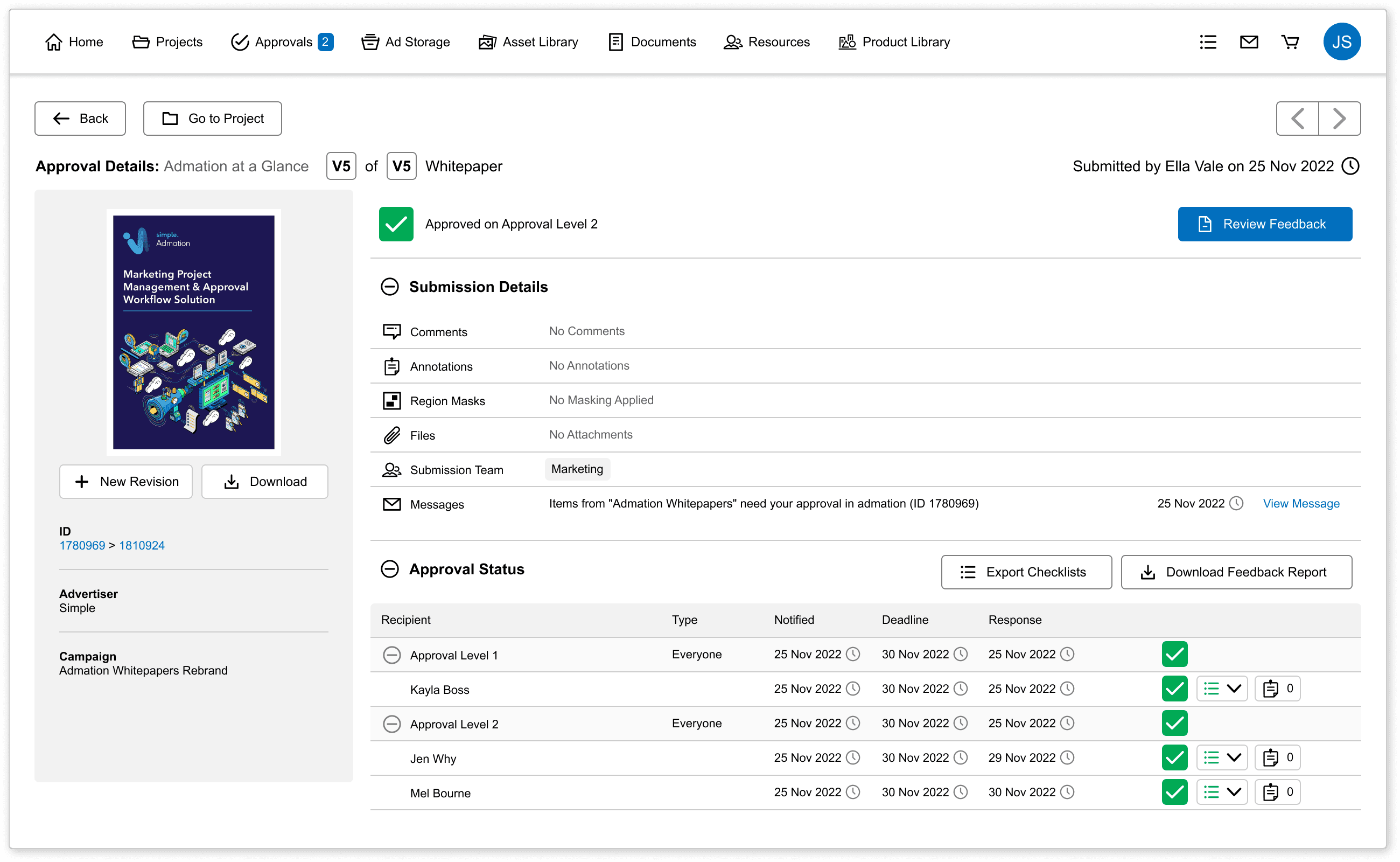
Every recorded action includes details of who performed it, when it was done and what changed. This supports marketing compliance and internal governance.

Full Version Tracking
View every version of each deliverable, see its status and download any previous file. This is ideal for creative teams, agencies and compliance reviews.

Feedback Reports
Download feedback summaries for any version, including comments, mark-ups and approval decisions. This ensures all decisions are documented and traceable.

Approval Workflow History
Review who approved, rejected or forwarded an asset, including timestamps and decision notes. This strengthens accountability across your marketing approvals.

Recalled Requests Logging
When approval requests are recalled, Admation records the event so the project history remains accurate and complete.

Key Benefits
Full Transparency Across Every Project
The audit trail eliminates ambiguity by providing a complete record of activity. Everyone stays aligned, and decisions are visible to all stakeholders.
Supports Marketing Compliance
Admation helps teams demonstrate compliance with internal policies, brand guidelines and regulatory requirements. Audit-ready documentation is available at any time.
Traceability for Approvals and Changes
Version histories and audit logs make it easy to trace how a project evolved, who approved each stage and what changed over time.
Faster Audit Preparation
Exportable logs, feedback reports and version histories mean teams can respond to audit requests quickly, without searching through emails or systems.
Reduced Miscommunication
With clear approval and version histories, teams avoid confusion about which version is final, who is responsible for changes or why decisions were made.
Improved Collaboration
Stakeholders get full visibility into the project’s progress, increasing trust and reducing the need for manual updates.
How It Works
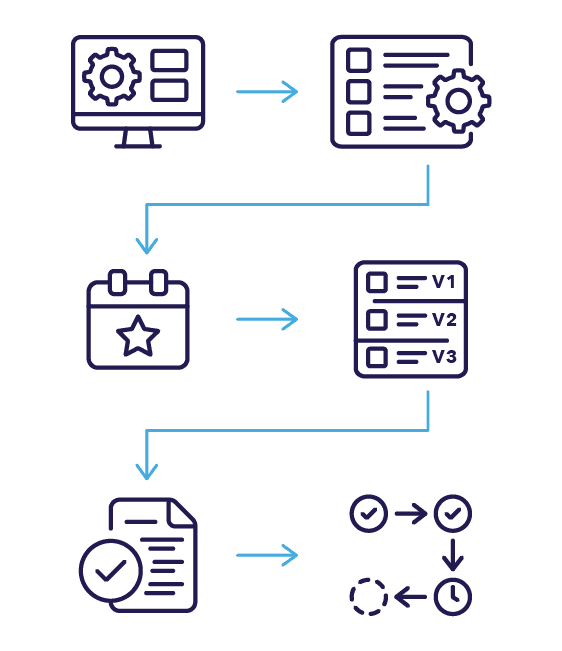
- Automatic Activity Tracking
Admation begins recording the moment a project is created. Every upload, change, comment, approval and version update is captured automatically in the background. - Open the Audit Trail Panel
Users can access the Audit Trail by opening any project and scrolling to the activity section — or expanding the full trail for deeper review. - Review Project Milestones
All key events appear in timestamp order, including artwork submissions, reviewer actions, pathway progression, decision points and final approvals. - Drill Into Version History
For any deliverable, users can open Version History to see previous files, reviewer comments, markups, change requests and outcomes. - Download Feedback Reports
If required, a consolidated feedback report (PDF) can be generated for any version, combining stakeholder comments into a clear summary. - Monitor Approval Decisions
The trail displays all approval outcomes — including forward actions, rejections, recalls, delegated decisions and final sign-off — giving complete clarity over how and when work was approved.
Use Cases
Marketing Compliance
Maintain a full documented approval history for regulated content — ideal for finance, insurance, healthcare and government organisations.

Creative Agencies
Provide transparent decision-making and approval history for clients without manual documentation.

Internal Audits
Supply auditors with complete, accurate project histories in minutes.

Project Managers
Monitor progress and track every update across deliverables to ensure timelines and approvals stay on track.

Audit Trail Challenges This Feature Solves
Missing Records
Approval history is often scattered across emails or chat threads, making it difficult to verify what was approved and when.
Unclear Ownership
Teams struggle to identify who approved specific changes, creating confusion and slowing project resolution during high-pressure review cycles.
Compliance Exposure
Manual systems make it hard to demonstrate compliance during audits, exposing teams to regulatory risk and unnecessary investigation effort.
Version Confusion
Without traceability, teams cannot reliably track what changed, who changed it, or why earlier versions were approved or rejected.
Inconsistent Processes
Inconsistent approval workflows across teams or agencies lead to governance issues, missed steps and uncontrolled variations in sign-off processes.
Market Risk
Without a centralised history, assets may accidentally bypass required reviewers and be released without proper checks.
Approval Disputes
Teams may disagree about who approved what when records are unclear, resulting in delays and unnecessary conflict between stakeholders.
Slow Investigation
Locating historical approval decisions is time-consuming without a central audit trail, slowing issue resolution and campaign analysis.
Weak Governance
Regulated claims, disclaimers and mandatory wording require strict oversight, which is difficult to maintain without documented approvals.
The audit trail is the evidence layer beneath the rest of the approval process. The route work travelled is defined by Admation’s approval templates; what each reviewer had to confirm before signing off is set by Admation’s approval checklists; where a decision was made on another person’s behalf, that delegation is handled by Admation’s act-on-behalf tools and is itself logged; and when an asset is finalised, its approval record follows it into storage. If you also need to check work against a rule set before it goes for approval, that is Admation’s AI Compliance Checking, which returns rules passed, failed and uncertain with an average confidence score — and writes that result into the same trail.
Frequently Asked Questions
What is an audit trail in marketing approval software?
An audit trail is an automatically generated, chronological record of every action taken on a marketing project — who uploaded an asset, who commented, who approved or rejected it, which version they were looking at and exactly when each of those things happened. Unlike an email chain or a folder of saved PDFs, it cannot be edited after the fact, which is what makes it usable as evidence. In Simple Admation the audit trail is created in the background from the moment a project starts, so there is nothing for the team to remember to do.
How do you prove who approved a piece of marketing content?
You need a record that ties a named approver to a specific version of an asset at a specific time, and that shows the approval followed the required review path. Approvals collected over email cannot do this reliably, because the message thread does not prove which version was attached or whether a mandatory reviewer was skipped. Admation records the approver, the decision, the version, the timestamp and the pathway the work travelled through, so the answer to who approved what is a lookup rather than an investigation.
What records do regulated industries need for a marketing compliance audit?
Regulated organisations are generally expected to show that required checks were completed before material went to market — claims substantiation, legal or compliance sign-off, mandatory disclaimers and correct use of brand and regulatory wording. In practice that means being able to produce, for any given asset, the version that was approved, who approved it, what they were shown and when. Admation’s audit trail and exportable feedback reports supply that evidence set for finance, insurance, healthcare and government marketing teams.
Can you export an approval history for an external audit?
Yes. Admation generates a consolidated feedback report as a PDF for any version of a deliverable, combining stakeholder comments, mark-ups and approval decisions into a single document, and version histories and audit logs can be exported alongside it. This is the difference between responding to an audit request in minutes and spending days reconstructing a decision trail from inboxes and shared drives.
Does an audit trail track changes to project dates and deadlines?
In Admation it does. The audit trail logs date changes and recalled approval requests as well as approvals and version updates, which matters because a missed deadline and a shifted deadline are different problems with different owners. Having those events recorded in the same chronological history means a project can be reviewed as it actually ran, rather than as it was originally planned.
See Admation’s audit trail in action. Watch a Demo to walk through how approvals, versions and decisions are recorded — or Book a Demo to see how it would document your own approval process.