
Online Proofing Software That Keeps Creative Reviews Moving
Admation's online proofing software gives marketing and creative teams one place to review, annotate, and approve any file — from campaign PDFs and print artwork to video, HTML, and digital assets. Clear markup tools. Structured approval pathways. Automatic version control. All inside a complete marketing workflow, so nothing moves between systems and nothing falls through the gaps.

One Place for All Creative Feedback
Comments, annotations, and approval decisions from every reviewer consolidate in a single interface. No more consolidating feedback from email, Slack, and shared drives. Everyone sees everyone else's input — in real time.
Fewer Revision Rounds, Faster Delivery
When reviewers see each other's comments, contradictory and duplicated feedback disappears before it reaches the creative team. Structured proofing workflows consistently reduce revision cycles and improve on-time delivery.
Always the Right Version, Every Time
Automatic version control means every reviewer opens the current file — not last week's. Full version history is accessible throughout, and four comparison modes make it easy to verify every change has been made.
Proofing Inside Your Marketing Workflow
Unlike standalone proofing tools, Admation connects the review screen directly to project timelines, approval governance, compliance checklists, and asset management. Review, approve, and archive in one unbroken flow.
Our Customers




Online Proofing Tools Built for Every Stage of the Creative Review Process
From first annotation to final sign-off, Admation covers every step of the review process — structured feedback tools, version comparison, approval routing, compliance checklists, and a complete audit trail — all without leaving the platform.
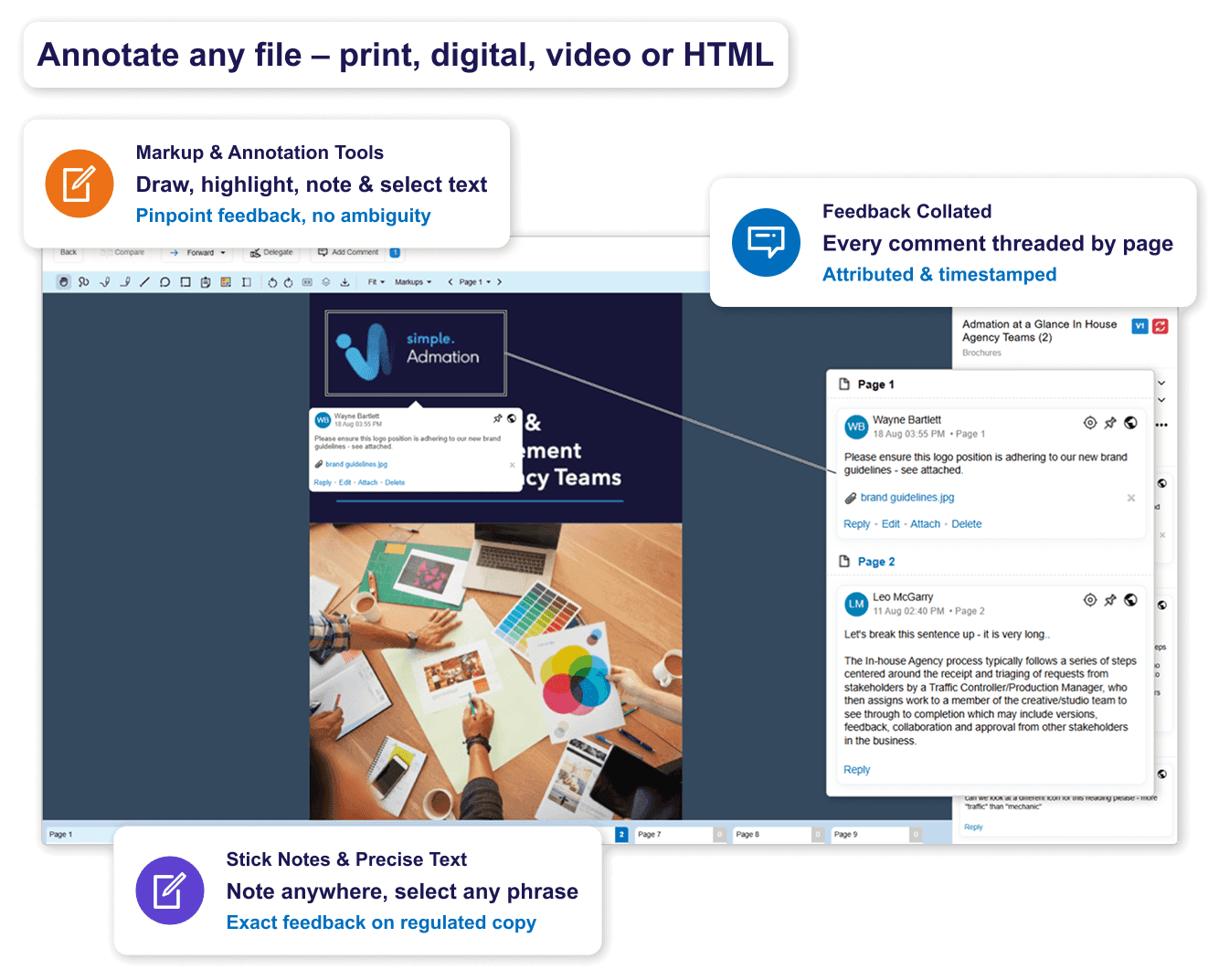
Annotate Directly on Every File Your Team Produces
• Approval Centre: A full-screen review environment built to maximise artwork visibility. The proofing interface adapts for each file type — print, digital, video, or HTML.
• Markup & Annotation Tools: Draw, highlight, add sticky notes, and select specific words or phrases directly on the asset — pinpoint feedback on copy, legal claims, or regulatory language without ambiguity.
• Multi-Format Proofing: Review PDFs, images, video frames, HTML/web previews, and documents in one unified interface. No switching tools for different file types.
• Precision Text Selection: Highlight specific words or phrases within artwork for exact feedback on regulated copy, financial claims, or legal language.
• Sticky Notes: Drop contextual notes anywhere on the artwork without drawing shapes — ideal for rapid feedback on high-volume campaigns.
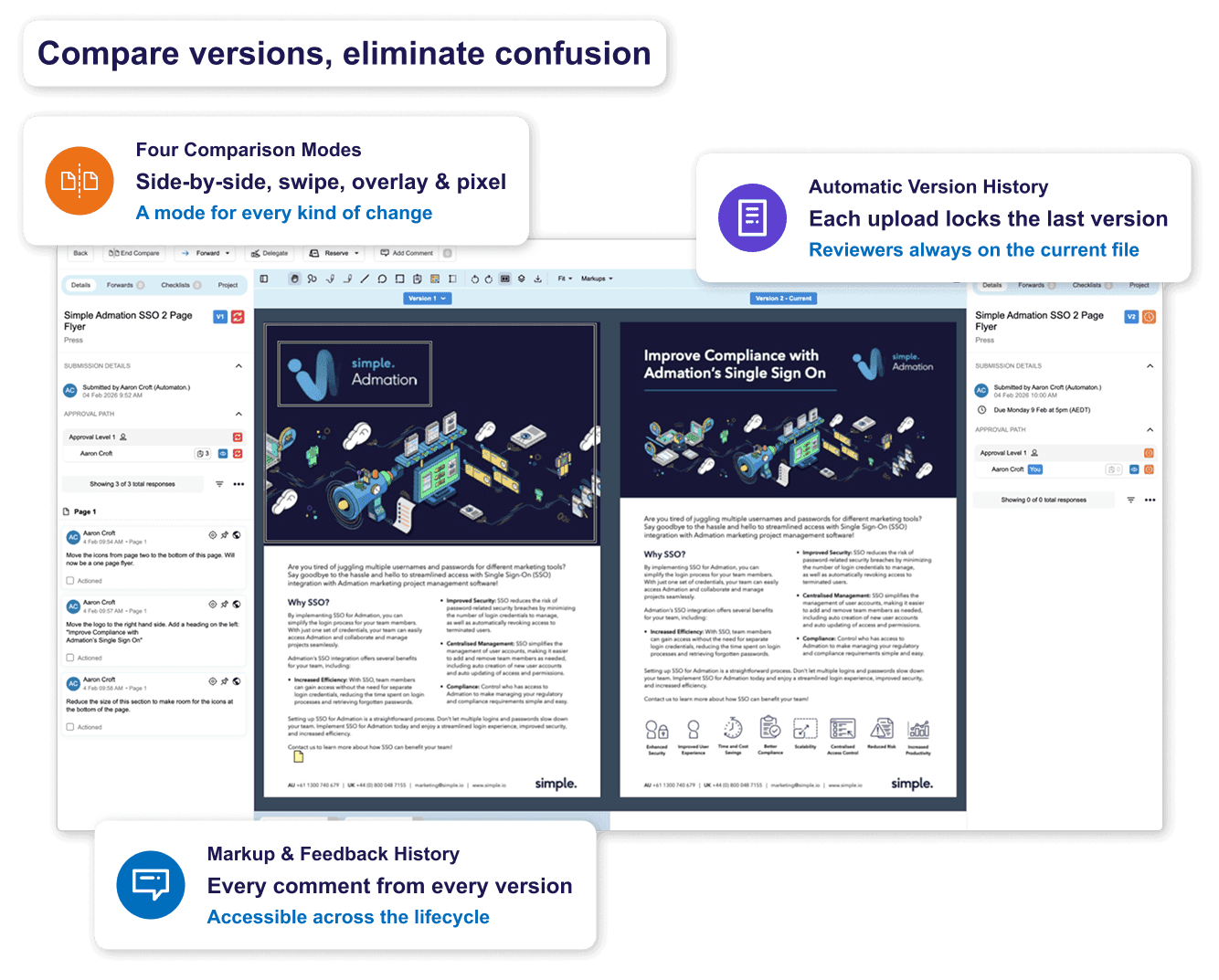
Compare Versions and Eliminate Confusion Before Final Approval
• Four Comparison Modes: Side-by-side, swipe, overlay, and pixel contrast — each suited to different review needs, from subtle copy changes to fine typographic differences.
• Automatic Version History: Every file upload creates a new tracked version. Previous versions are locked once a new one is uploaded, so reviewers always work on the current file.
• Markup & Feedback History: Every comment and annotation from every previous version remains accessible throughout the project lifecycle.
Structure Reviews So the Right People Sign Off
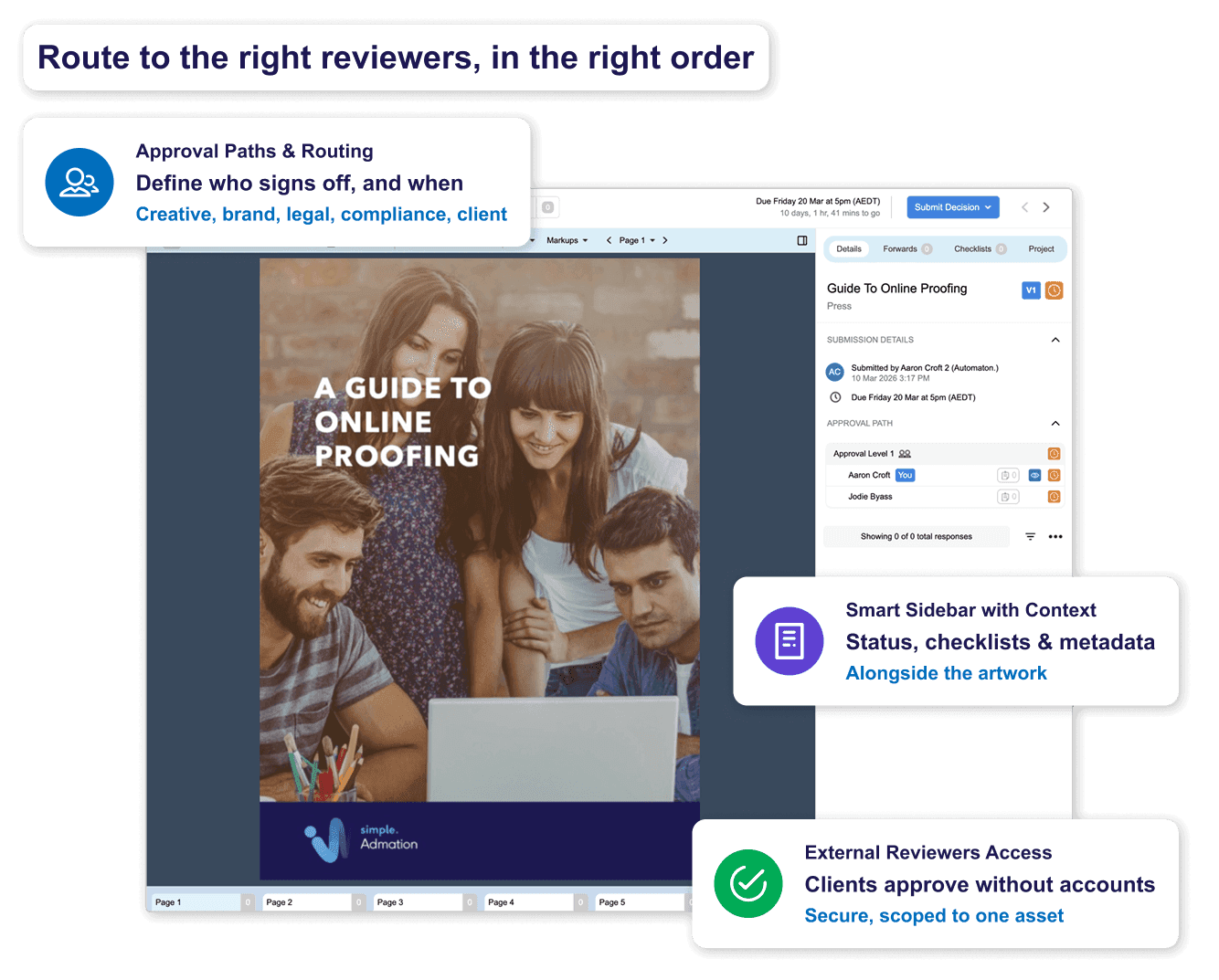
• Approval Paths & Routing: Define who reviews at each stage — creative, brand, legal, compliance, client — and in what order. Assets route automatically when the previous stage is complete.
• Smart Sidebar with Review Context: Approval path status, forwarded comments, checklists, and asset metadata appear in a structured sidebar alongside the artwork.
• Markup List with Filters: All annotations from all reviewers consolidate in a unified, filterable list. Filter by reviewer, role, or comment type — and share a single de-duplicated feedback view with the creative team.
• External Reviewer Access: Clients and external agencies review and approve assets through secure access without Admation accounts. See full approval workflow and routing
Approve, Archive, and Stay Compliant — All in One Step
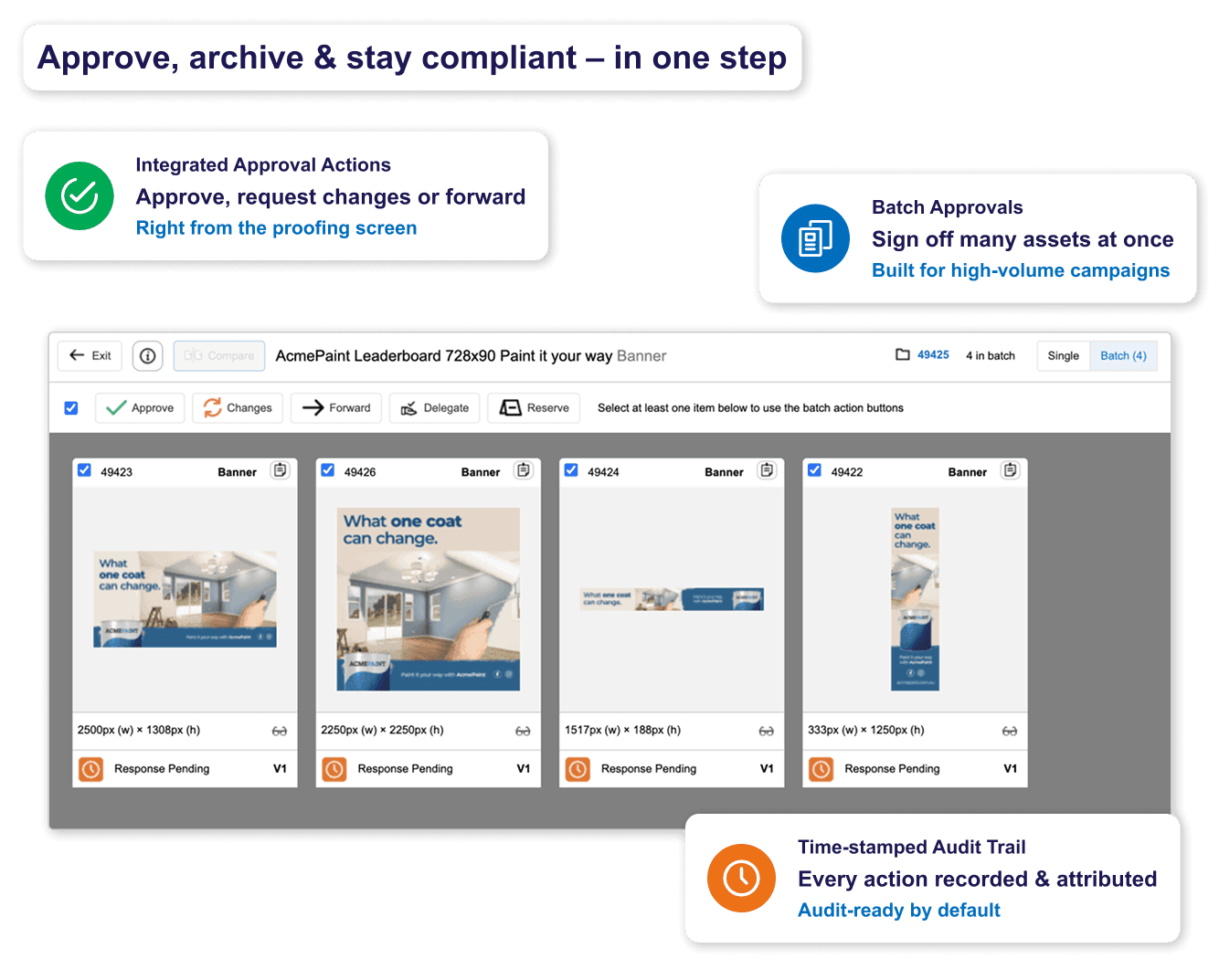
• Integrated Approval Actions: Approve, request changes, or forward items to additional reviewers directly from the proofing screen.
• Batch Approvals: Approve multiple assets simultaneously for high-volume campaigns with many similar deliverables.
• Automated Reminders: Reviewers receive automatic alerts when assets are ready and deadline reminders as sign-off dates approach.
• Time-Stamped Audit Trail: Every comment, markup, version upload, approval decision, and forwarded action is recorded with a timestamp and user attribution.
• Approval Checklists: Attach structured compliance checklists to each approval stage. Reviewers must confirm every required step before they can approve.
• AI Compliance Check integration: When an AI compliance check identifies a failed rule in a multi-page PDF, failed rules link directly to the specific page — the approver opens it in the proofing view, draws a markup and applies the AI's feedback response as a comment in one click.
Admation Online Proofing Features
Approval Centre
Full-screen review interface built for artwork clarity.

Markup & Annotation
Draw, highlight, sticky notes — directly on any asset.

Precision Text Selection
Highlight specific words or sentences for pinpoint feedback.

Multi-Format Proofing
PDFs, images, video, HTML, documents — all in one interface.

Sticky Notes
Rapid contextual notes without drawing shapes.

Unified Proofing Toolbar
All tools — zoom, rotate, annotate, compare — in one toolbar.

Version Comparison
Four modes: side-by-side, swipe, overlay, pixel contrast.
Automatic Version Control
Every upload creates a tracked version. History always accessible.

Markup & Feedback History
Full comment history across all versions, always accessible.

Smart Sidebar
Approval path, checklists, and context in one structured view.

Markup List with Filters
Filter all annotations by reviewer, role, or comment type.

Collated Feedback
Single, consolidated feedback list for the creative team.

Approval Paths & Routing
Multi-stage routing: creative, brand, legal, compliance, client.

Integrated Approval Actions
Approve, request changes, or forward — from proofing screen.

Batch Approvals
Approve multiple assets simultaneously for high-volume campaigns.

External Reviewer Access
Secure client and agency review without internal credentials.

Automated Reminders
Auto-alerts and deadline reminders — no manual chasing.

Audit Trail
Time-stamped record of every review action.

Approval Checklists
Mandatory compliance steps before sign-off can be given.

AI Compliance Checking
When an AI compliance check flags a failed rule, page-level links open directly in the proofing view — apply AI feedback as a markup comment in one click.

Role-Based Access Control
Define who views, comments, and approves at each stage.

Legal Reserve
Hold assets for legal review before other stakeholders action.

Frequently Asked Questions
What is online proofing software?
Online proofing software is a platform that enables marketing and creative teams to review, annotate, and approve creative assets in a centralised digital environment. It replaces email-based reviews with structured workflows, visual markup tools, version control, and approval routing — so all feedback is consolidated, all versions are tracked, and approvals are documented. For a complete guide to how online proofing works, see Online Proofing Software: A Complete Guide.
How does Admation’s online proofing differ from standalone proofing tools?
Standalone proofing tools handle review and annotation well, but they sit alongside your existing project management, compliance, and asset management tools — creating another point solution to manage. Admation embeds online proofing inside a full marketing workflow — brief capture, project management, approval governance, compliance management, reporting, and asset management are all native. Teams that need an end-to-end marketing platform, not another disconnected tool, choose Admation.
What file types can be reviewed in Admation?
Admation supports PDFs, images including print artwork, video files, HTML and web previews, and documents. The proofing interface adapts for each format — print artwork uses markup tools optimised for design, video files support frame-accurate annotation, and HTML assets can be reviewed directly in the proofing environment. All file types are reviewed inside the same approval workflow without switching tools.
How does version control work in the proofing workflow?
Every file upload in Admation creates a new tracked version automatically. Previous versions are locked once a new version is uploaded, ensuring reviewers can only annotate the current file. All previous versions, comments, and markups remain accessible for reference throughout the approval lifecycle, and four comparison modes allow reviewers to verify changes between rounds. The approved version is definitively identified and linked to the audit trail.
Can Admation’s online proofing meet compliance requirements for regulated industries?
Yes. Every comment, markup, approval decision, version upload, and forwarded action is recorded with a timestamp and user attribution. Approval checklists require reviewers to confirm compliance steps before sign-off can be given. Role-based access control limits who can review sensitive content. For financial services, insurance, and healthcare marketing teams, this provides the documented review history required by regulators. See Marketing Compliance Software and AI Compliance Checking for full compliance capabilities.
Can external clients and agencies review assets without an Admation account?
Yes. External reviewers — clients, agency partners, or third-party stakeholders — access and approve specific assets through secure external approval links, without internal credentials or exposure to other projects. All external review actions, comments, and approval decisions are captured in the same audit trail as internal approvals, providing a complete sign-off record regardless of whether the reviewer is inside or outside your organisation. For agencies managing client approval processes, see Ad & Creative Agencies.

Stop the revision spiral. Start shipping great work on time.
See how Admation's online proofing keeps creative reviews structured, transparent, and fast — inside a complete marketing workflow.
Watch a DemoRelated Solutions
Marketing Approval Workflow Software
Manage the full brief-to-sign-off approval process for marketing campaigns. Learn more about Approval Workflow

AI Compliance Checking
Run an on-demand AI-powered check on any asset before it enters the proofing review queue — page-level failure links open directly in the proofing view. Learn more about AI Compliance Checking

Marketing Compliance Software
Structured checklists, audit trails, and tiered approvals for regulated industries. Learn more about Marketing Compliance

Digital Asset Management
Store, tag, and distribute approved creative assets securely. Learn more about Asset Management

Creative Briefing Software
The step before proofing — capture complete, approved briefs before creative production begins. Learn more about Creative Briefing

Marketing Project Management
Plan and manage the full campaign timeline that proofing sits inside — from brief to final delivery. Learn more about Project Management

Marketing Resource Management
Manage the team capacity and scheduling needed to keep creative production and review cycles on track. Learn more about Resource Management

Online Proofing: A Complete Guide
What online proofing software is, how it works, the benefits it delivers, and what to look for when choosing a platform. Read the complete guide

Simple Admation
See the complete Admation platform and all its capabilities. Learn more about Admation