
Online Proofing Software: A Complete Guide
What it is, how it works, and why it matters for modern marketing teams.
Marketing teams today are producing more content, across more channels, with more stakeholders involved in approvals than at any point before. Yet many teams are still managing that complexity with tools – email, spreadsheets, printed mark-ups – that were never designed for it.
Online proofing software changes that. It gives marketing and creative teams a single, structured environment for reviewing, annotating, and approving creative assets – with full visibility, version control, and an audit trail built in from the start.
This guide explains what online proofing software is, how it works, the benefits it delivers, the challenges it solves, and what to look for when selecting a platform.
If you’re already convinced you need it and want a practical evaluation, head to Online Proofing Software: Benefits, Signs You Need It & How to Choose.
What Is Online Proofing Software?
Online proofing software is a digital platform that enables marketing and creative teams to review, annotate, and approve creative assets within a single centralised workspace. It replaces email-based feedback loops with structured workflows, version control, and a complete audit trail of every comment, change, and approval decision.
Unlike traditional proofing methods – printing assets, marking them up by hand, scanning them back, or forwarding email threads between stakeholders – online proofing software digitises and automates the entire process. Assets are uploaded once, reviewed in-platform by all relevant stakeholders, and moved through defined approval stages without ever leaving the system.
The result is a process that is faster, more transparent, and far less prone to the errors and miscommunications that plague email-based approval workflows.
Who uses online proofing software?
Online proofing software is used primarily by:
- Marketing teams managing high volumes of campaign assets across multiple channels
- Creative and design teams who need structured, actionable feedback from multiple reviewers
- Marketing agencies managing content approval on behalf of clients
- Legal and compliance teams who need to review and sign off on regulated marketing content
- Project managers overseeing creative production across complex, multi-stakeholder campaigns
In practice, teams often use online proofing software across all of these groups simultaneously – bringing internal creative teams, external agencies, client stakeholders, and compliance reviewers into a single shared workspace.

How Online Proofing Works
Online proofing software creates a structured, trackable workflow for every creative asset from upload to final sign-off. Here is how a typical online proofing process works:
1. File upload and distribution
Creative assets – images, PDFs, videos, HTML files, Word documents – are uploaded into the platform and made available to relevant stakeholders in a shared, secure workspace. No more attaching files to emails or chasing people for the latest version.
2. Mark-up and annotation
Reviewers provide feedback directly on the asset using annotation and mark-up tools. Comments are attached to specific elements – a particular line of copy, a section of an image, a frame of a video – so context is never lost and designers know exactly what needs to change.
3. Approval routing
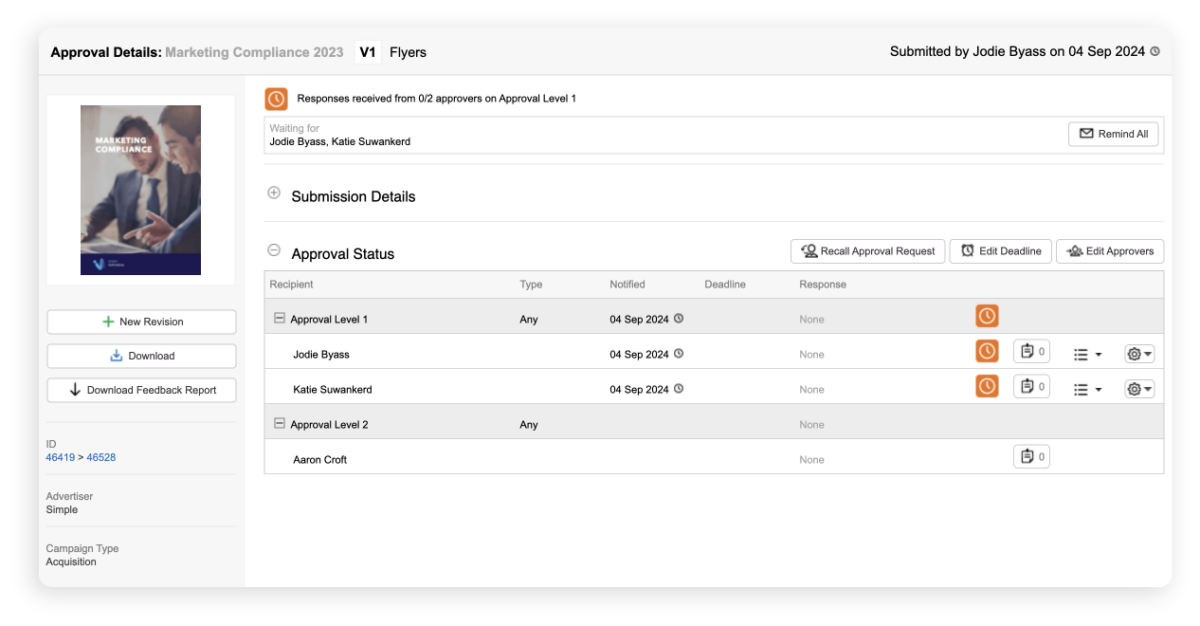
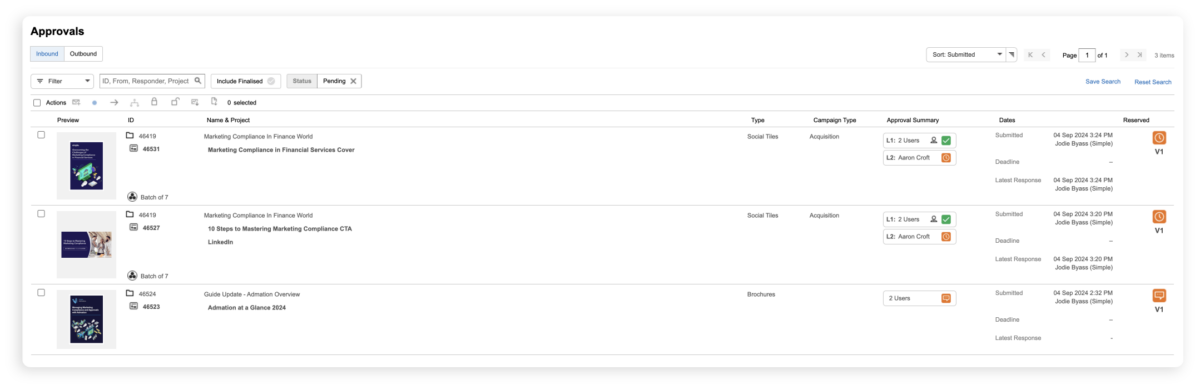
Custom approval workflows define which stakeholders need to review each asset and in what order. Assets move automatically through each approval stage once the required sign-offs are received. Reviewers are notified automatically when it’s their turn – no manual chasing required.
4. Version tracking
Every revision is saved and stored. Stakeholders can compare versions side by side to confirm that all requested changes have been implemented correctly. There is never any ambiguity about which version is current.
5. Final approval and archiving
Once all required approvals are received, the asset is marked as complete and stored securely. Platforms that integrate with Digital Asset Management (DAM) software move approved assets automatically into a centralised, searchable repository for future use.
Key Benefits of Online Proofing Software
The following benefits are consistently reported by marketing teams that have moved from email-based approval processes to dedicated online proofing software. For a full breakdown with supporting detail, see 10 Benefits of Online Proofing Software.
Improved collaboration
All stakeholder feedback is centralised in one place, visible to every team member in real time. This eliminates the need to consolidate input from multiple email threads and ensures no comment is missed or actioned twice. Teams can see exactly where every project is in the process at any time.
Workflow automation
Approval workflow automation removes the routing, notification, and reminder steps that typically consume significant administration time. Assets reach the right reviewers at the right stage automatically, and stakeholders are prompted when their input is outstanding.
Fewer revisions and faster approvals
When feedback is clear, contextual, and visible to all reviewers simultaneously, the number of revision rounds drops significantly. Side-by-side version comparison ensures changes are implemented correctly before an asset progresses to the next stage.
Full transparency and accountability
Every brief, comment, change request, and approval decision is logged with a timestamp and attributed to a named individual. Work-in-progress reports can be generated instantly. There is never any ambiguity about where a project stands or who is responsible for the next action.
Improved marketing compliance
For teams operating in regulated industries – financial services, health and pharma, retail – compliance is not optional. Online proofing software embeds legal and compliance review directly into the approval workflow, creates a complete audit trail, and ensures no asset reaches market without the required sign-offs.
Cost savings
Reduced revision rounds mean less designer time, fewer external stakeholder hours, and lower printing costs. Teams freed from approval administration have more capacity for creative work. The cumulative financial impact of a more efficient approval process is measurable and significant.
The Challenges of Traditional Proofing Methods
Understanding why online proofing software matters requires understanding what it replaces. Traditional approval methods – email chains, printed proofs, shared drives, manual spreadsheet tracking – create the following recurring problems:
Time-consuming and slow
Email-based approval processes are inherently sequential and reactive. Feedback arrives at different times, from different stakeholders, in different formats. Consolidating it into something actionable takes significant time – and that’s before accounting for chasing outstanding approvals.
Version control failures
When assets are shared via email or file-sharing links, version control breaks down quickly. Stakeholders review and mark up different versions. Conflicting feedback is actioned simultaneously. The result – version sprawl – is one of the most common and costly problems in creative production.
Feedback that lacks context
Email feedback is often vague precisely because reviewers can’t see what others have said. Without visibility over the full set of comments, reviewers duplicate feedback, contradict each other, or miss the point entirely. Each round of clarification adds time and introduces the risk of errors.
Compliance gaps
When approvals happen informally – across email threads and Slack messages – there is no reliable audit trail. Compliance reviewers can be accidentally bypassed. Legal requirements can slip through. The consequences of a compliance failure – particularly in regulated industries – can be severe.
Poor visibility for distributed teams
Traditional proofing methods assume co-location. When stakeholders are distributed across offices, time zones, or organisations, the process breaks down. There is no shared view of project status, no central repository of feedback, and no consistent process for external reviewers.
When to Implement Online Proofing Software
For a detailed breakdown of the signs that your team needs online proofing software, see 7 Signs Your Team Needs Online Proofing Software. In summary, consider implementing a dedicated online proofing platform if:
- Approval feedback is being managed primarily through email
- Your team regularly experiences version control issues or version sprawl
- Revision counts per project are consistently higher than they should be
- Compliance review steps are being missed or are difficult to document
- External stakeholders – clients, agencies, freelancers – are difficult to coordinate
- Project deadlines are regularly missed due to delayed approvals
- There is no clear, real-time view of where projects stand in the approval process

What to Look For in Online Proofing Software
If you’re evaluating specific platforms, our complete evaluation guide covers a practical 6-step framework and full features checklist. At a strategic level, the most important factors to consider are:
Does it support your full range of file types?
Most platforms handle PDFs and images. Fewer handle video, HTML, and web content. If your team produces content across multiple formats, confirm that the platform you choose supports mark-up and annotation across all of them.
Can it be configured to match your approval workflow?
Generic software with fixed approval paths will not accommodate the nuances of your process. Look for platforms that allow custom workflow configuration – including parallel and sequential review stages, conditional routing, and role-based access control.
How does it integrate with your existing tools?
Online proofing software delivers the most value when it connects with your broader marketing tech stack – project management, digital asset management, cloud storage, and creative tools. Assess integration capabilities carefully, including any associated costs.
Does it meet your compliance and security requirements?
For organisations in regulated industries, audit trails, role-based access, and secure cloud storage are non-negotiable. Confirm that the platform meets your organisation’s data governance and security requirements before committing.
What does implementation and ongoing support look like?
The most common point of failure for new software is adoption, not functionality. Evaluate the vendor’s onboarding process, training options, and ongoing support offering alongside the product itself.
Where Online Proofing Software Is Heading
The online proofing category is evolving quickly. Three trends are shaping where it’s going – and they matter for any team making a platform decision now.
AI-assisted review and quality control
AI is beginning to appear in online proofing workflows in practical ways: automated brand compliance checking, flagging of potential legal or regulatory issues in copy, and intelligent routing suggestions based on asset type. These capabilities are early-stage in most platforms, but will become a meaningful differentiator over the next two to three years. Teams evaluating platforms now should ask vendors about their AI roadmap.
Deeper integration with the end-to-end marketing workflow
The direction of travel is clear: standalone proofing tools are giving way to integrated platforms that connect proofing with project management, resource management, and digital asset management in a single environment. Teams that adopt integrated platforms now will have a structural advantage over those managing multiple disconnected tools.
Remote and distributed team support as a baseline, not a feature
The shift to hybrid and distributed working has made the ability to collaborate across locations, time zones, and organisations a baseline expectation rather than a differentiating feature. Platforms that treat external stakeholder access as an afterthought will increasingly fall short. Look for platforms where external reviewer access is seamless, not bolted on.
Admation: Online Proofing Built for Marketing Teams
For marketing teams looking for an online proofing solution that goes beyond standalone review tools, Admation combines online proofing with project management, resource management, and digital asset management in a single platform.
Where most online proofing tools focus on the review and annotation layer, Admation covers the full creative production lifecycle – from brief to final approved asset – without requiring teams to switch between systems. This is particularly valuable for marketing teams in regulated industries, where compliance, audit trails, and approval accountability are as important as speed.

Stop the revision spiral. Start shipping great work on time.
Admation is used by marketing teams across financial services, insurance, retail, and agency environments. To see how it works:
Book a DemoFrequently Asked Questions
What is the difference between online proofing and proofreading?
Proofreading is the process of checking written content for errors in grammar, spelling, punctuation, and style. Online proofing is a broader process that covers the review, annotation, and approval of all types of creative assets — including images, video, design files, and web content — within a structured approval workflow. Online proofing software facilitates this process; it is not a grammar or spell-checking tool.
What types of files can online proofing software handle?
This varies by platform. Most handle common image formats (JPEG, PNG, TIFF), PDFs, and Word documents. More advanced platforms — including Admation’s online proofing — support video files (MP4, MOV), HTML content, website URLs, and creative software outputs. When evaluating platforms, confirm compatibility with all the file types your team regularly produces.
What industries use online proofing software?
Online proofing software is used across any industry that produces marketing content at volume. It is particularly prevalent in financial services and insurance, health and pharmaceuticals, and retail — industries where compliance requirements mean that every piece of content must be reviewed and approved by multiple stakeholders, with a documented audit trail.
Can external stakeholders use online proofing software?
Yes. Most platforms allow external reviewers — clients, partner agencies, freelancers, legal teams — to access and annotate assets without needing a full user account. This is one of the core advantages over email-based feedback: all stakeholders, internal and external, work within the same system on the same version. See how Admation’s external approvals capability manages client and agency review without internal credentials.
What is the difference between online proofing and digital asset management?
Online proofing manages the active review and approval process — the journey an asset takes from creation to final sign-off. Digital asset management (DAM) is a repository for completed, approved assets. The two are complementary: proofing manages the workflow; DAM stores the outcomes. Integrated platforms like Admation connect both so that approved assets flow automatically from the proofing environment into the DAM without manual transfers. For teams needing a standalone DAM, see Simple Asset Manager.
How does online proofing software support marketing compliance?
Online proofing software supports marketing compliance in three ways. First, legal and compliance teams can be embedded directly in approval workflows, ensuring they review every asset before it reaches market. Second, every comment, change, and approval is logged with a timestamp and attributed to a specific individual, creating a complete and exportable audit trail. Third, custom approval paths prevent assets from progressing past a stage until all required sign-offs have been received. For a full guide to marketing compliance requirements in Australia, see Marketing Compliance: The Complete Guide.
How long does it take to implement online proofing software?
Implementation timelines vary by the complexity of your approval workflow, the number of users, and the integrations required. Straightforward deployments can be operational within days; more complex enterprise implementations with custom workflow configuration and system integrations may take several weeks. Vendor-led onboarding, training support, and clear internal project ownership are the key factors in a successful and timely implementation. Book a demo to discuss your specific requirements with the Admation team.
Related Resources
Online Proofing Software
The complete practical guide for teams evaluating online proofing platforms. Read the complete guide

Approval Workflow Software
How Admation simplifies marketing approval workflows end to end. Learn more about Approval Workflow

Digital Asset Management
Centralise, organise and share approved creative assets. Learn more about Asset Management

Marketing Project Management
Manage campaigns from brief to delivery in one platform. Learn more about Project Management

Marketing Compliance
Built-in compliance controls for regulated marketing environments. Learn more about Marketing Compliance