
Creative Brief Software That Starts Every Campaign Right
Most campaign problems start with the brief - scope not defined, compliance requirements missed, stakeholders who signed off without reading it. Admation's creative briefing software structures brief capture with mandatory-field templates, stakeholder approval pathways, and briefs that live inside the same platform as the project, proofing, and approvals.

Capture What Matters Upfront
Custom brief templates with mandatory fields ensure every project starts with complete objectives, deliverables, deadlines, compliance requirements, and stakeholder details - not discovered halfway through production.
Get Briefs Approved Before Work Begins
Route completed briefs through a fast approval pathway. Stakeholders review and confirm scope, requirements, and compliance parameters upfront - reducing the revision cycles that come from unclear initial direction.
Brief, Project, and Approval in One Place
Briefs don't live in a separate document or email. They sit inside Admation alongside the project tasks, approval pathway, and final files - so every team member accesses the same current version throughout the campaign.
Duplicate Briefs for Recurring Campaigns
Duplicate completed briefs for similar projects or recurring content. Inherit the structure, compliance requirements, and key fields - maintaining consistency and eliminating setup time for predictable campaign types.
Our Customers





Structured Brief Templates
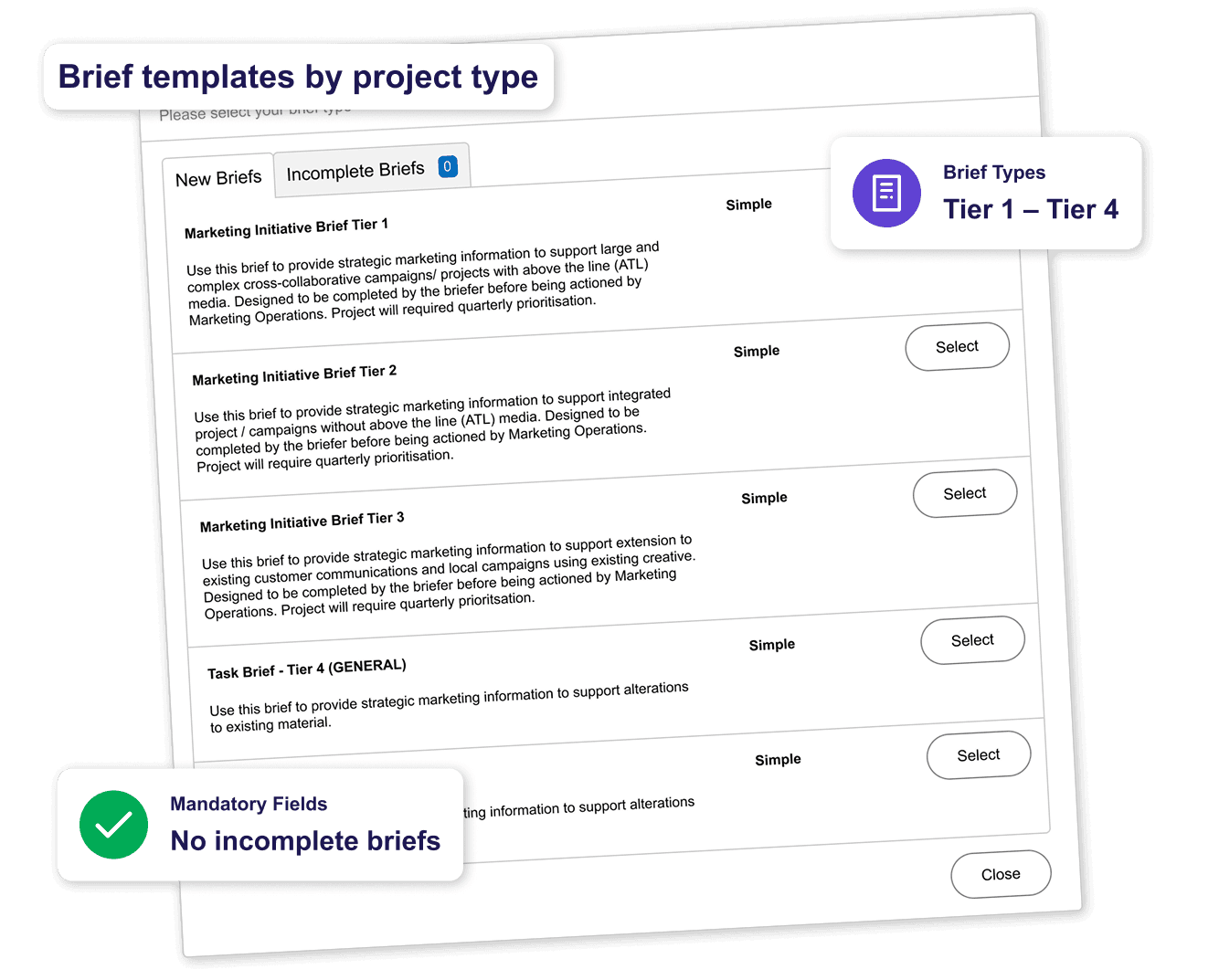
The quality of a creative brief directly affects the quality of the work that comes from it. Admation's brief templates ensure structure, completeness, and consistency across every project - regardless of who creates the brief.
• Custom Brief Templates: Create templates for different project types - campaign, content, digital, print, video, social - each capturing the specific information that type of work requires.
• Mandatory Fields: Set required fields that must be completed before a brief can be submitted - prevents incomplete briefs from entering the workflow.
• Rich Brief Detail: Capture purpose, objectives, target audience, budgets, resources, approvals, deadlines, and compliance requirements in a structured, searchable format.
• Diverse Brief Types in One Format: Brand, product, campaign, and regulatory project types all captured in consistent templates within the same platform.
Brief Approval Pathway
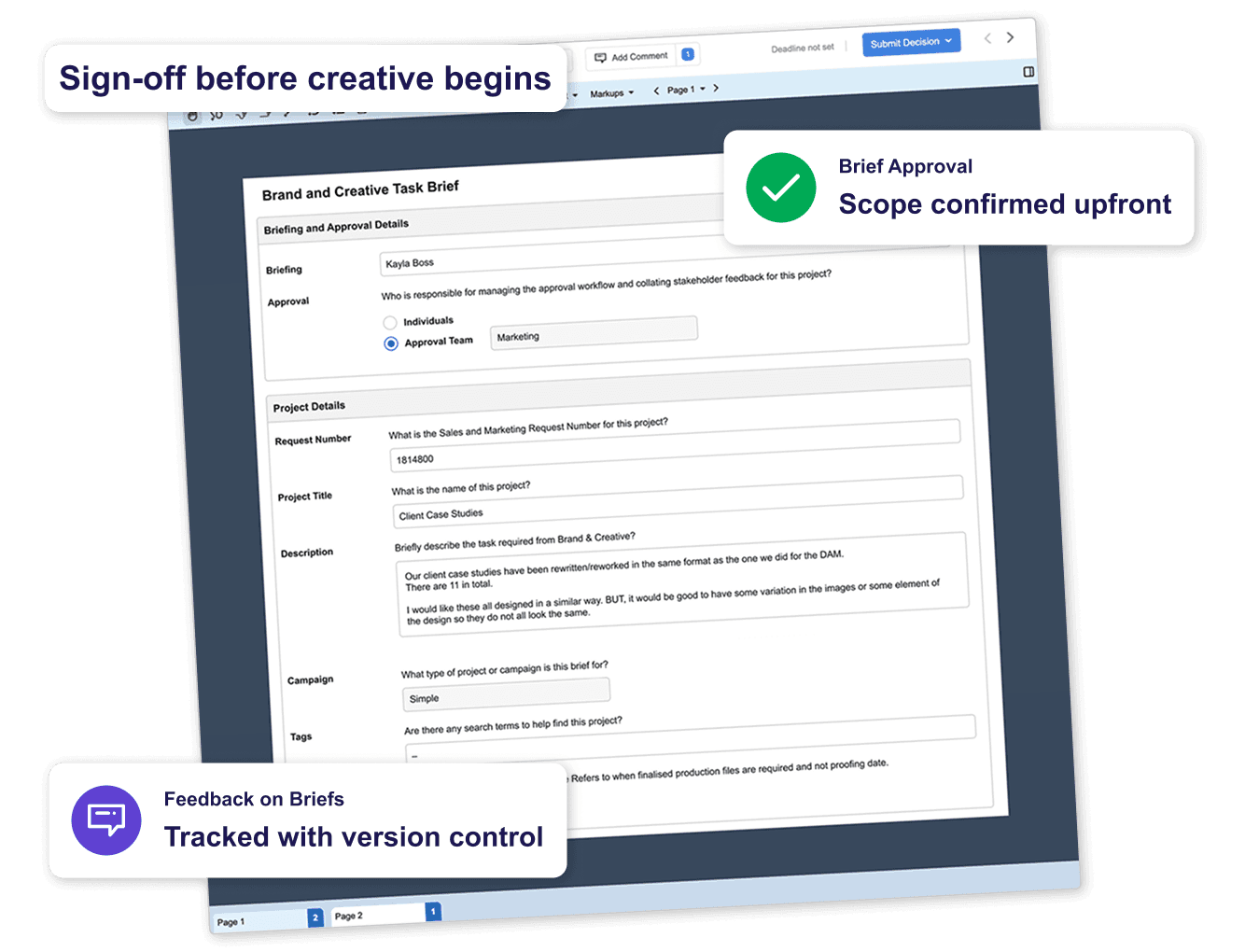
A brief isn't ready to act on until it's been reviewed and approved. Admation's brief approval pathway gets stakeholder sign-off before creative work begins - the fastest way to reduce revision cycles.
• Brief Review & Approval: Route completed briefs through a templated approval pathway - stakeholders confirm scope, compliance requirements, and resource availability before a single task is created.
• Brief Approval Routing: Define who reviews and approves briefs for each project type - from a single fast sign-off to sequential review by manager, compliance, and client.
• Feedback on Briefs: Reviewers comment directly on the brief - changes are captured with version control so the brief evolves rather than being lost in email.
See the full approval workflow for assets and campaigns: Marketing Approval Workflow Software
Brief Management Within the Project
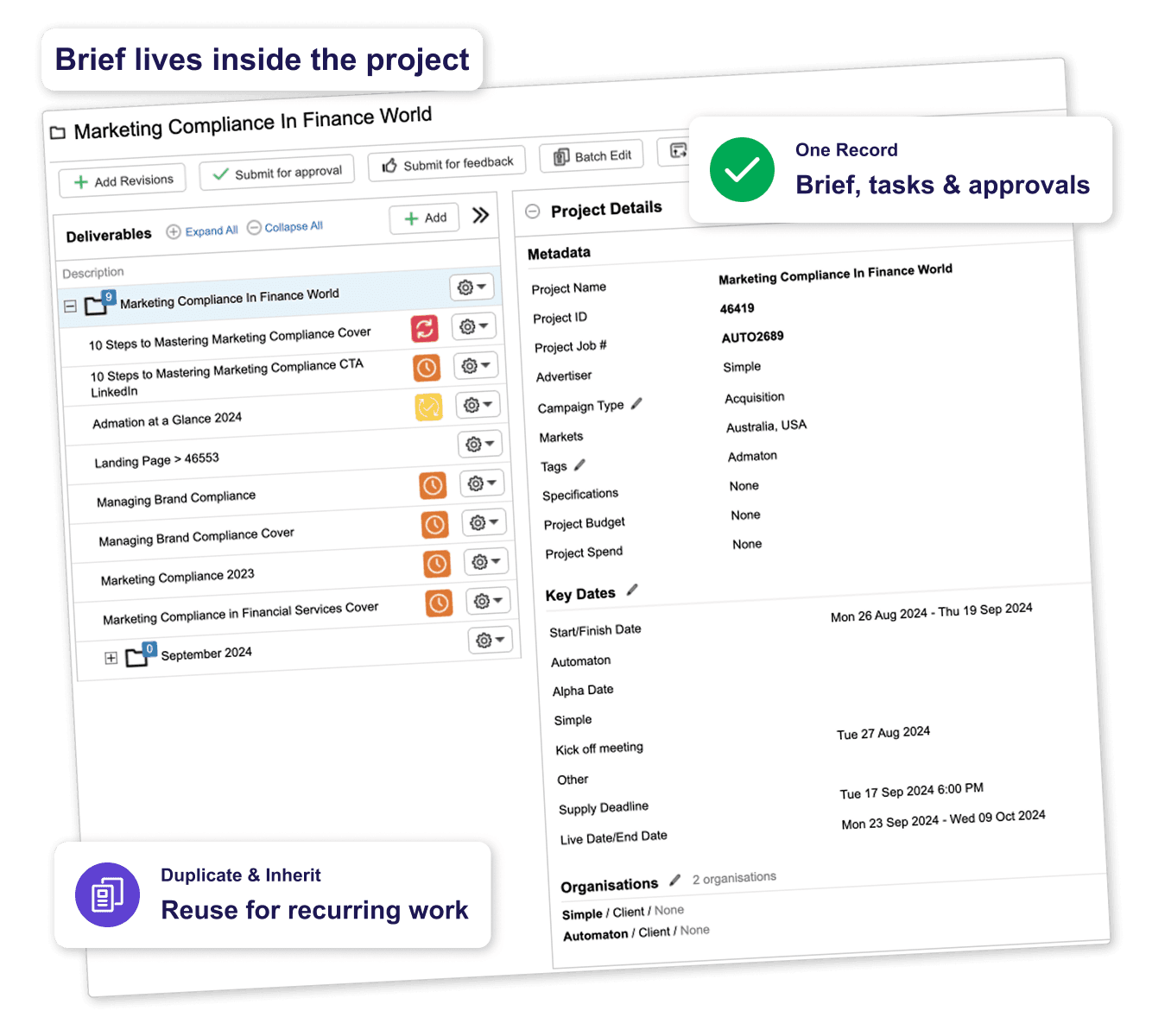
Briefs are most useful when they stay connected to the work they originate. In Admation, the brief is part of the project - not a separate document that gets abandoned after kick-off.
• Briefs Inside Projects: Project briefs sit alongside tasks, approval pathways, assets, and final files within the same project record - accessible to every team member throughout the campaign.
• Brief Duplication: Duplicate briefs for recurring campaigns or similar project types - inherited fields reduce setup time while maintaining consistency.
• Inherited Fields: Speed up brief creation for related projects by inheriting fields from a parent brief or previous project.
• Compliance Requirements in Briefs: Attach regulatory guidelines, compliance frameworks, or disclosure requirements directly to the brief - visible to every stakeholder from day one.
See project management and campaign planning: Marketing Project Management Software
Admation Creative Briefing Features
Custom Brief Templates
Different templates for different project types.

Mandatory Fields
Required fields prevent incomplete briefs.

Rich Brief Detail
Objectives, budgets, deadlines, compliance - all in one.

Brief Approval Pathway
Route briefs through sign-off before work begins.

Brief Approval Routing
Define who reviews briefs for each project type.

Feedback on Briefs
Comments directly on the brief with version tracking.

Brief Duplication
Copy completed briefs for similar or recurring campaigns.

Inherited Fields
Speed up brief creation for related projects.

Compliance in Briefs
Attach regulatory documents and requirements at brief stage.

Briefs Inside Projects
Brief stays connected to tasks, approvals, and assets.

Brief Version Control
Every change to the brief is tracked.

Diverse Brief Types
Brand, campaign, product, digital - all consistent formats.

Frequently Asked Questions
What is the best software for managing marketing briefs?
The best marketing brief software helps marketing teams standardise requests, capture all required information, manage approvals, and automatically connect approved briefs to project delivery. While general project management tools often collect requests through simple forms, purpose-built creative briefing software manages the entire workflow from brief submission through to campaign execution. For organisations operating in regulated industries, it should also provide audit trails, version history and compliance controls. Admation is designed for this purpose, combining structured brief templates, mandatory fields, approval workflows and project management in one platform, so every approved brief becomes the foundation for delivering creative work.
How do enterprise marketing teams manage creative briefs?
Enterprise marketing teams typically replace email, Word documents and spreadsheets with a centralised creative briefing system. Every marketing request is submitted through a standardised brief template with mandatory fields, routed through a defined approval workflow, and converted into the project it describes. At enterprise scale, governance is just as important as efficiency, so organisations need visibility into who requested the work, who approved the scope and budget, and which compliance requirements apply. Admation provides this structured intake process for enterprise marketing teams and in-house agencies, with centrally managed templates, configurable approval pathways and a complete audit trail from submitted brief through to delivered campaign.
What marketing brief software suits mid-sized marketing teams?
Growing and mid-sized marketing teams often need more structure than shared documents or basic project management tools can provide, but without the implementation overhead that large work management platforms typically involve. The practical requirements are standardised brief templates, mandatory fields, approval workflows, and a direct connection between approved briefs and project delivery — implemented in weeks rather than months, and manageable without a dedicated administrator. Admation meets these requirements with the same enterprise-grade platform used by large marketing teams and in-house agencies: centrally managed templates, configurable approval pathways and integrated project management that scales as the organisation grows into more complex and regulated work.
How does Admation’s creative briefing software work?
Admation provides structured creative brief templates with mandatory fields, configurable approval workflows and version control, ensuring every marketing brief is complete before work begins. Once approved, the brief becomes part of the live project, with all requirements, stakeholders, assets, tasks and approvals connected in a single workflow. This removes duplicate data entry, improves collaboration, and ensures everyone works from the same approved scope throughout the project lifecycle.
Can brief templates be customised for different project types?
Yes. Admation supports multiple creative and marketing brief templates for different campaign and project types, including digital campaigns, content marketing, social media, print, video, product launches and regulated communications. Each template can include its own mandatory fields, optional information, approval requirements and default values. Templates are managed centrally, ensuring every team follows a consistent briefing process while still capturing the information required for different types of creative work.
How does brief approval work in Admation?
Once a marketing brief is completed, Admation routes it through a predefined approval workflow based on the project type. Stakeholders can review the brief, provide feedback, request changes and approve the scope before creative work begins. Every revision is version controlled, while approvals are recorded with timestamps and a complete approval history. This creates a formal audit trail showing who approved the brief, when approval occurred, and which version was authorised for production.
How does Admation support regulated marketing teams at the brief stage?
For regulated industries such as banking, financial services, insurance, healthcare, pharmaceuticals and government, compliance starts with the brief. Admation enables marketing teams to capture regulatory requirements, mandatory disclosures, approval obligations and compliance notes before creative work begins. Compliance teams can attach policies, guidelines or supporting documents directly to the brief, while approval workflows can require formal compliance sign-off before any project progresses. This helps organisations reduce risk and build marketing compliance into the creative workflow from the very beginning.
How does brief management in Admation reduce revision cycles?
Many revision cycles are caused by incomplete briefs, unclear project requirements or changes that occur after creative work has already started. Admation helps prevent these issues by requiring mandatory information before submission, capturing stakeholder approval before production begins, and keeping the approved brief connected to the project throughout its lifecycle. By providing a single source of truth for every project, marketing teams reduce unnecessary rework, protect time and budget, and keep creative teams focused on delivery.
Does Admation integrate brief management with the rest of the campaign workflow?
Yes. In Admation, the creative brief is the starting point for the entire marketing workflow rather than a standalone document. Information captured in the brief automatically supports project planning, task management, resource allocation, compliance workflows, online proofing and final approvals. Because briefing, project management, creative production and approvals all happen within one platform, teams avoid duplicate information, disconnected systems and manual handovers. The result is a more efficient creative workflow with complete visibility and traceability from the initial brief through to the finished campaign.
Start every campaign with a brief that actually works.
Admation's brief templates, mandatory fields, and brief approval pathway ensure every project starts with complete, signed-off direction.
Watch a DemoRelated Solutions
Marketing Approval Workflow Software
Manage the full brief-to-sign-off approval process for marketing campaigns. Learn more about Approval Workflow

Marketing Project Management
Brief capture is the first step in full campaign management. Learn more about Project Management

Marketing Compliance Software
Structured checklists, audit trails, and tiered approvals for regulated industries. Learn more about Marketing Compliance

Online Proofing Software
Review and annotate creative assets directly in Admation — the next step once a brief is approved and production begins. Learn more about Online Proofing

Marketing Resource Management
Plan the team capacity and resource allocation needed to deliver what the brief commits to — before work begins. Learn more about Resource Management

What Is a Creative Brief?
The complete guide to brief management — what a brief should contain, why briefs fail, and how brief approval works in practice. Read the in-depth guide

How to Write a Creative Brief
A step-by-step guide to writing briefs that reduce revision cycles and keep campaigns on track from kick-off to delivery. Read the guide

Simple Admation
See the complete Admation platform and all its capabilities. Learn more about Admation