
What Is Digital Asset Management? A Complete Guide to DAM Software
Digital asset management (DAM) is a centralised system for storing, organising, finding, and distributing a brand's digital files — images, video, audio, documents, and design assets. DAM software replaces scattered file servers, shared drives, and email attachments with a single, searchable repository that gives every team member access to the right asset, in the right version, at the right time.
For marketing and creative teams dealing with an ever-growing volume of brand assets across more campaigns and channels than ever, that single sentence covers the core job. But the reality of what modern DAM software does — and doesn’t do — is worth understanding in more depth, especially if you’re evaluating whether a DAM system is the right solution for your organisation.
This guide walks through what digital asset management is, how a DAM system works, the problems it solves, who benefits most, and what to look for when choosing a platform. If you’re already clear on the fundamentals and want to see how Simple Asset Manager approaches DAM, go straight to the Digital Asset Management solution page.

Why Digital Asset Management Matters
Most marketing teams reach a DAM tipping point. It usually arrives somewhere between managing 500 and 5,000 brand assets across multiple campaigns, and it looks like this: someone launches a campaign using last year’s logo. A legal team discovers a stock image being used past its licence expiry. An agency partner can’t find the approved brand guidelines and produces materials with the wrong colour palette. A social media manager can’t tell which version of a product image is approved for the current quarter.
These aren’t fringe failures — they’re the predictable result of managing digital assets without a system designed for the job. Shared drives and cloud storage tools were built for file storage, not brand asset governance. They have no concept of version control, rights management, approval status, or metadata-driven search. As asset libraries grow, so do the gaps.
Digital asset management software was built specifically to close those gaps. The right DAM system doesn’t just store assets — it adds structure, governance, and findability to every file your brand produces.
How a Digital Asset Management System Works
A DAM system functions as the central hub for a brand’s digital content lifecycle — from initial upload and tagging through to review, approval, distribution, and eventual archiving. At its core, it does five things that shared drives and cloud storage cannot:
1. Centralised Storage and Organisation
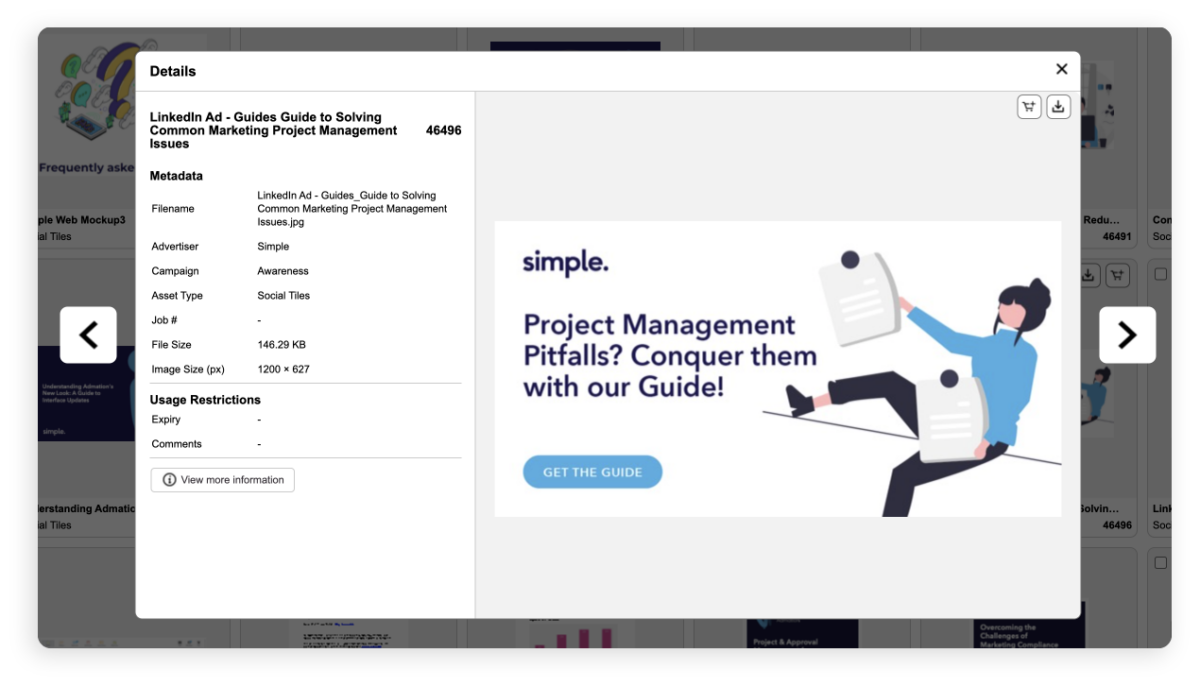
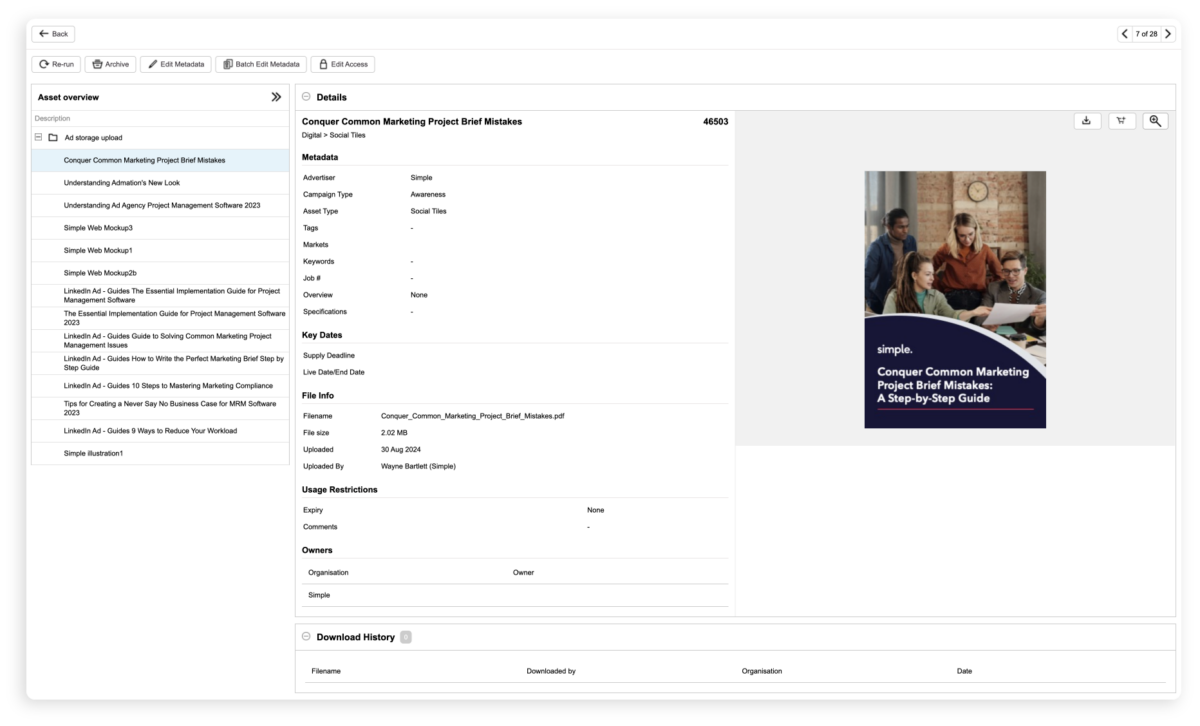
All assets — images, video, audio, PDFs, design files, brand guidelines, and templates — are uploaded into a single repository. Rather than being organised only by folder structure (which breaks down quickly at scale), DAM software layers metadata, tags, and taxonomies on top of the folder system, making every asset discoverable by multiple search paths simultaneously.
2. AI-Powered Search and Tagging
Modern DAM platforms use artificial intelligence to automatically tag assets based on their content. An image of a woman at a desk in an office might be automatically tagged with: person, workplace, professional, lifestyle, office, indoors — without any manual input. OCR (optical character recognition) makes text inside images and PDFs searchable too. Combined with custom campaign tags and metadata fields, this means a team member can find a specific asset in seconds rather than minutes, even without knowing exactly where it was filed.
3. Rights Management and Usage Controls
Licensed content — stock photography, commissioned music, third-party video — comes with usage restrictions that need to be actively managed. DAM software attaches licence terms, usage rights, permitted channels, and expiry dates directly to each asset. Automated alerts notify teams when licences are approaching expiry. Role-based permissions control which users can access, download, or share which assets. Without this, the risk of using an expired licence or distributing a restricted asset is a matter of when, not if.
4. Approval Workflows and Version Control
Not every asset in a DAM is ready to use. A DAM system connected to approval workflows ensures that assets go through the appropriate review and sign-off stages before they’re available to the broader team or external partners. Version control tracks every iteration of an asset, locks previous versions once a new one is uploaded, and maintains a complete history — so teams always work from the approved current version, and there’s a documented record of every change.
5. Controlled Distribution
Once assets are approved, a DAM makes distribution controlled and traceable. Internal teams, external agencies, franchisees, and retail partners can each be given access to the specific assets and collections relevant to their role — without access to the full library. Download carts allow batch downloads in format-specific outputs. Every download, share, and distribution action is logged with a timestamp and user attribution.
The Key Benefits of Digital Asset Management Software
The direct business case for a DAM system tends to be built around six core benefits:
- Faster asset retrieval: Teams stop spending hours searching for files. AI-powered search and structured metadata typically reduce asset retrieval time from minutes to seconds — a measurable productivity gain across every team that touches brand content.
- Brand consistency across channels: Brand consistency is enforced by a single source of truth for all approved assets — the right logo, the right colour palette, and approved imagery reaches every campaign, channel, and external partner. Outdated assets stop reaching production.
- Reduced compliance risk: Usage rights management, approval audit trails, and licence expiry alerts reduce the risk of using unlicensed content, distributing restricted assets, or publishing unapproved creative — all of which carry real legal and financial consequences.
- Better collaboration between internal and external teams: Agencies, franchisees, and retail partners get controlled access to the assets they need. Centralised feedback and approval tools mean reviews don’t get lost across email threads and Slack channels.
- Higher content ROI: Assets that are findable get reused. A well-managed DAM library means campaign imagery, video, and brand content gets repurposed across markets and channels rather than sitting unfound on a server or being recreated from scratch.
- Faster time to market: When approved assets are instantly accessible and approval workflows are structured, campaigns get to market faster. Teams spend less time on admin and rework, and more time on the work itself.
The Problems a DAM System Is Designed to Solve
Most organisations arrive at a DAM evaluation after experiencing one or more of these recurring problems:

Who Benefits from a Digital Asset Management System?
DAM software is most often led by marketing and brand teams, but the benefit extends across every function that creates, uses, or distributes digital content:
- Marketing and campaign managers: Fast access to approved assets by campaign, product line, or channel. No chasing creative teams for the latest version before a deadline.
- Brand managers: Control over which assets are available to which teams and partners. Single source of truth for brand guidelines, logos, and approved imagery.
- Creative teams and in-house agencies: Version-controlled working files, structured feedback and approval flows, and seamless handoff to production without losing the asset trail.
- Sales teams: On-demand access to current sales collateral, case studies, and product imagery — especially useful for distributed or field-based sales teams.
- Agencies and external partners: Controlled access to the specific assets they need, without full library access — reducing confidentiality risk and the version confusion that comes with email distribution.
- Franchisors and multi-location brands: Approved assets and localised content distributed to each location or franchisee with the right permissions — ensuring brand consistency at scale without manual distribution overhead.
- Compliance, legal, and risk teams: Audit trails, usage rights records, and approval documentation provide the evidence trail required by regulators in financial services, healthcare, insurance, and other regulated sectors.
What Types of Assets Does a DAM System Manage?
Modern DAM platforms are designed to handle the full range of rich media and brand content a marketing team produces. This typically includes:
- Images and photography — JPEG, PNG, TIFF, RAW, and layered PSD/AI design files
- Video — MP4, MOV, and broadcast formats, with frame-level preview and transcoding to channel-specific outputs
- Audio — Podcast files, voiceovers, jingles, and licensed music in MP3, WAV, and other formats
- Documents and presentations — PDFs, Word files, and PowerPoint presentations, including sales collateral and brand guidelines
- Marketing collateral — Brochures, flyers, banners, email templates, and social media assets for each platform format
- Design source files — Adobe Illustrator, Photoshop, and InDesign working files with version history maintained alongside finished outputs
The DAM’s value grows as the volume and variety of asset types increases — which is why organisations that produce content across multiple channels, markets, or product lines tend to see the fastest ROI after implementation.
DAM vs Cloud Storage: What's the Difference?
This is the most common question from teams starting a DAM evaluation, particularly those already using Dropbox, Google Drive, or SharePoint. The distinction matters because the two tools have fundamentally different purposes:

Cloud storage tools are useful for everyday file collaboration. DAM software is designed specifically for brand content governance — with the structure, search, rights management, and approval tools that cloud storage was never built to provide.
What to Look for When Choosing DAM Software
The DAM market covers a wide range of platforms — from standalone tools designed purely for asset storage and retrieval to fully integrated platforms that connect DAM with creative workflow, approval management, and compliance. Before evaluating vendors, it helps to know which capabilities matter most for your organisation:
- Search quality and AI tagging: The difference between a DAM your team actually uses and one that gets abandoned is usually search. Test how quickly and accurately you can find an asset without knowing exactly where it was filed. AI tagging quality varies significantly between platforms.
- Rights and licence management: If your team uses licensed stock content, the DAM must be able to store licence terms, track expiry dates, and alert your team before a licence lapses. This is non-negotiable for teams in regulated industries or with significant licensed content libraries.
- Approval workflow integration: Standalone DAM tools store assets — but they don’t govern them. A DAM connected to approval workflows ensures assets are reviewed and signed off before they’re available to distribute, closing the gap between storage and governance.
- Permission granularity: The ability to set different access levels for different teams, agencies, and regions — so external partners get the assets they need without full library access, and sensitive or restricted content stays protected.
- Integration with existing tools: DAM works best when connected to the rest of your marketing stack — creative tools, project management, content management systems, and e-commerce platforms. Check what native integrations the platform offers and how data flows between systems.
- Scalability and total cost of ownership: Some DAM platforms charge by storage volume, others by user count, others by feature tier. Understand the full cost at your current size and at projected growth before committing.
If you’re evaluating DAM software and want a structured framework for the assessment, the DAM Buyer’s Guide covers the key questions to ask and the criteria to apply.
How Simple Asset Manager Approaches Digital Asset Management
Simple Asset Manager is a digital asset management platform built for marketing and brand teams that need more than a file library. It combines AI-powered search and metadata management with connected approval workflows, rights management, and controlled distribution — giving teams a complete asset governance solution, not just a better place to store files.
A few things distinguish how Simple Asset Manager approaches DAM:
- Connected to approval workflows: Assets in Simple Asset Manager aren’t just stored — they’re governed. Approval pathways route assets through the appropriate review and sign-off stages before they’re distributed. Version control and audit trails are built into the process, not bolted on after.
- AI search that works at scale: AI-assisted tagging automatically assigns metadata based on asset content. OCR makes text in images and PDFs searchable. Custom keyword fields and campaign taxonomy let teams build search structures that match how they actually work. The result is a library that stays findable even as it grows to tens of thousands of assets.
- Rights management built in: Licence terms, usage restrictions, permitted channels, and expiry dates attach to each asset at upload. Automated alerts flag approaching expiries. The audit trail records every download, share, and distribution — so there’s always a documented record of how each asset has been used.
- Part of a complete marketing workflow: Unlike standalone DAM tools, Simple Asset Manager sits alongside Admation’s creative briefing, project management, online proofing, and compliance tools. Assets flow from brief to production to archive inside one connected workflow — without switching systems or manually transferring files between platforms.
Organisations including Vicinity Centres, David Jones, Choice Hotels, and Chiesi use Simple Asset Manager to manage brand assets at scale. For a full view of the platform’s capabilities, visit the Simple Asset Manager solution page. If you’re assessing your current asset management setup before evaluating tools, the DAM self-assessment is a useful starting point.

Frequently Asked Questions
What is digital asset management?
Digital asset management (DAM) is a system for storing, organising, finding, and distributing a brand’s digital files — images, video, audio, documents, and design assets. DAM software adds AI-powered search, metadata management, version control, rights management, and approval workflows to a central asset repository — capabilities that cloud storage and shared drives were not built to provide.
What is the difference between a DAM and cloud storage?
Cloud storage tools like Dropbox, Google Drive, and SharePoint are designed for file storage and basic sharing. DAM software is purpose-built for brand asset governance — with AI-powered search and tagging, usage rights and licence tracking, approval workflows, version control, role-based permissions, and a complete audit trail. The distinction matters most for teams managing large volumes of brand content with compliance, brand consistency, or rights management requirements.
What types of files can a DAM system manage?
Modern DAM systems manage the full range of digital files a marketing team produces — images (JPEG, PNG, RAW, PSD), video (MP4, MOV, broadcast formats), audio (MP3, WAV), PDFs, Word documents, PowerPoint presentations, Adobe design files (Illustrator, InDesign, Photoshop), marketing collateral, and social media assets. Most platforms also support file format conversion so assets can be exported in channel-specific outputs without leaving the system.
How does a DAM system support brand consistency?
A DAM system supports brand consistency by making a single, approved library the only source your teams work from. Permissions ensure that only authorised, current assets are accessible to each team, partner, or region. Version control locks superseded assets once a new version is approved. The result is that every team — internal and external — works from the same approved creative, reducing the off-brand materials, wrong-version errors, and inconsistent campaign assets that occur when brand assets are stored across multiple locations.
Does DAM software help with regulatory compliance?
Yes, particularly for marketing teams in regulated industries. DAM software supports compliance in several ways: usage rights management prevents the use of expired or out-of-scope licensed content; approval workflows create a documented sign-off trail for every asset before it’s published; audit logs record every download, share, and distribution with timestamp and user attribution; and role-based permissions prevent unauthorised access to restricted content. For financial services, insurance, healthcare, and pharmaceutical marketing teams, these capabilities directly support the audit and evidence requirements of relevant regulators.
Related Resources
Digital Asset Management Software
See Simple Asset Manager's full feature set and how the platform is used by marketing teams. Learn more about Asset Management

DAM Buyer's Guide
A structured guide to evaluating and selecting DAM software — questions to ask, criteria to apply. Read the complete guide

PIM vs DAM: Navigating the Right Solution for Business Growth
Understanding when you need a DAM, a PIM, or both — and how they work together. Read the complete guide

Why Digital Asset Management Is Essential for Brand Consistency
How DAM software prevents off-brand materials and ensures consistent creative across campaigns. Read the complete guide

Digital Asset Management Audits
A practical guide to auditing your existing asset library — what to assess, how to structure it, and when to do it. Read the complete guide

Online Proofing Software
Review, annotate, and approve creative assets — connected to asset management in one platform. Learn more about Online Proofing
