
Ad Storage & Secure Asset Sharing for Approved Marketing Assets
Marketing and creative teams rely on fast access to approved assets — final artwork, documents, digital deliverables and production files. But when work lives across servers, desktops, email threads or cloud drives, teams struggle to find the right file, confirm its approval status or share it safely with external partners. This creates delays, brand risk and compliance exposure.
Admation’s Ad Storage & Secure Asset Sharing provides a governed, centralised repository for all approved and finalised deliverables. Every campaign is archived with versions, metadata and production files, making it easy to retrieve, reuse, rerun or distribute assets securely.
This feature is ideal for marketing teams, brand teams, creative studios, agencies, e-commerce teams and regulated industries needing visibility, governance, secure sharing and assured version accuracy across all final marketing assets.
What Problem Does This Feature Solve?
Marketing teams manage high volumes of creative work — campaigns, deliverables, variations, localised versions and regulatory materials. Without a centralised, governed asset archive, teams work from outdated files, duplicate effort, struggle to locate final versions and rely on untracked distribution methods.
Ad Storage & Secure Asset Sharing eliminates these issues by consolidating finalised assets, providing structured governance and enabling secure, auditable external distribution.
- Scattered Final Assets
Final creative files live in email threads, cloud folders or personal drives, making retrieval slow and inconsistent across teams. - Unclear Final Versions
Teams often use unapproved or outdated artwork because the “final file” isn’t clearly identified or centrally stored. - Inefficient Campaign Reuse
Without production files and metadata stored together, teams rebuild assets unnecessarily when rerunning or localising campaigns. - Risky External Distribution
Emailing files or using untracked links creates compliance, confidentiality and security risks with no audit trail. - Inconsistent Governance
Different departments store assets differently, leading to missing metadata, outdated expiry settings and compliance blind spots. - Slow Cross-Team Retrieval
Teams spend unnecessary time searching for past assets or requesting files from colleagues, slowing down approvals and campaign timelines. - Untracked File Downloads
Organisations cannot see who accessed what, when assets were shared, or how they were used — limiting compliance oversight. - Unmanaged Access Permissions
Without controlled access, confidential assets may be visible to users who shouldn’t see them, creating brand and legal risk. - Duplicated File Creation
Teams recreate assets because they cannot locate existing files quickly or verify which version is correct.
What Is Ad Storage & Secure Asset Sharing?
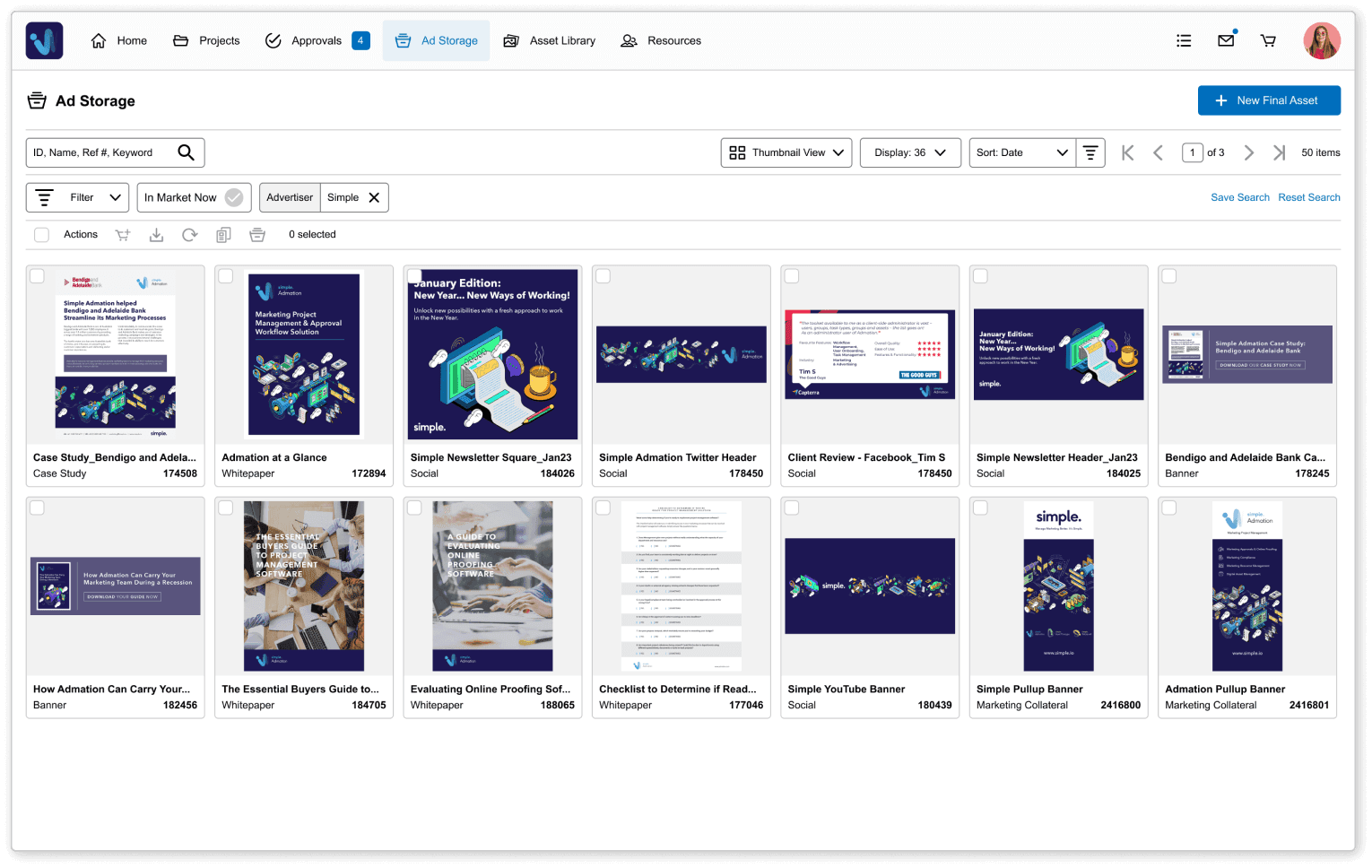
Ad Storage is Admation’s central repository for all finalised marketing assets. When a deliverable is approved and finalised, it moves from the project workflow into Ad Storage along with metadata, usage restrictions and production files.
Secure Asset Sharing (previously called the Cart) allows users to select assets, configure access controls and distribute files safely to internal or external partners. All downloads are logged, providing complete visibility and compliance tracking.
Together, these tools give organisations a dependable, transparent and secure system for storing, reusing and sharing approved marketing assets.
Key Features
Centralised Asset Repository
Store all approved marketing assets and production files in one governed, searchable location for easy retrieval.

Automatic Archiving
Assets move into Ad Storage automatically upon finalisation, capturing metadata, versions, expiry settings and confidentiality controls.

Advanced Search & Filtering
Find assets quickly using filters such as ID, campaign, market, dates, format, agency or metadata values.

Production File Storage
Access original working files, packaged artwork, high-resolution outputs and supporting documents to simplify reruns or updates.

Confidential Asset Controls
Mark assets as confidential and limit visibility to selected users for sensitive or high-risk creative work.

Usage Expiry & Restrictions
Apply or update usage limits to prevent expired, outdated or non-compliant assets from being reused.

Secure Asset Sharing
Prepare assets for distribution using a controlled sharing workflow that replaces risky email attachments.

External Recipient Support
Share assets with printers, distributors, agencies or partners without granting system access.

Download Tracking & Audit Logs
See who downloaded which files, when and for what purpose — essential for compliance in regulated industries.

Bulk Select & Share
Choose multiple assets at once to create collections, share campaign sets or prepare files for distribution.

Version Accuracy Assurance
Ensure stakeholders always access approved, final, correct versions — reducing errors and brand inconsistencies.

Key Benefits
Single Source of Truth
Teams access one accurate system for all approved assets, reducing searching, duplication and reliance on email or external drives.
Faster Campaign Reuse
Production files and metadata make it easy to rerun, update or localise campaigns without recreating assets from scratch.
Stronger Compliance Governance
Expiry settings, access controls and audit logs protect against outdated or incorrect files being used in regulated environments.
Improved Brand Consistency
Only approved, finalised assets are visible for reuse, maintaining visual identity and messaging across all campaigns.
Secure External Distribution
Assets are shared via controlled links with tracked downloads — eliminating security risks associated with emailing files.
Clear Ownership and Accountability
Every user action — access, download, share — is logged, supporting governance, regulatory audits and legal review.
Reduced Admin for Marketing Teams
Teams no longer hunt for files, chase colleagues or rebuild lost assets, freeing time for creative and strategic work.
Better Cross-Team Collaboration
All departments access the same archive, supporting alignment across marketing, brand, e-commerce, design and compliance teams.
How It Works
- Finalise or Upload Assets
Approved deliverables and associated production files move into Ad Storage automatically or can be uploaded manually for complete archival coverage. - Search and Filter Your Archive
Locate assets instantly using filters for campaign, market, dates, metadata or deliverable type. - Preview and Validate Files
Confirm artwork, metadata, usage restrictions and production files before reuse or rerun campaigns. - Add Items to Secure Sharing
Select relevant approved assets and move them to the Secure Sharing area for managed distribution. - Configure Access & Permissions
Apply confidentiality controls, select internal or external recipients and set usage or download restrictions. - Distribute & Track Downloads
Recipients receive a secure download link. Admation records all activity to support compliance, audits and governance reporting.

Use Cases
Marketing Teams
Retrieve approved assets quickly to support new campaigns, BAU work, seasonal planning or cross-channel execution.

Creative Studios
Access production files, artwork packages and approved references to support reruns, updates or localisation.

Agencies
Share approved assets securely with printers, media partners or distributors without manual file transfers.

Retail & E-Commerce Teams
Reuse approved assets across product pages, weekly promotions, store signage and digital catalogues.

Compliance & Legal Teams
Ensure only approved, compliant assets are accessible and track exactly how and when files are used.

Challenges Ad Storage & Secure Asset Sharing Solve
Lost Final Assets
Teams struggle to locate approved creative because files sit across email threads, servers or personal drives, increasing rework, delays and compliance exposure.
Unclear Final Versions
Without a governed archive, stakeholders accidentally reuse outdated or unapproved assets, creating brand inconsistency and regulatory risk across campaigns and channels.
Inefficient Campaign Reuse
Teams rebuild assets unnecessarily because historic deliverables, metadata and production files cannot be accessed quickly for reruns, updates or localisation.
Risky File Distribution
Email-based sharing creates security, confidentiality and compliance risks because downloads are untracked and recipients are uncontrolled.
Inconsistent Governance
Different teams store assets differently, resulting in missing metadata, outdated expiry settings and confusion about approved versions.
Slow Retrieval Times
Teams spend unnecessary time searching for past work or requesting files from others, delaying approvals and campaign timelines.
Untracked External Access
Organisations cannot see what was downloaded, when or by whom, limiting governance, audit readiness and risk oversight.
Unmanaged Permissions
Sensitive or restricted assets may be visible to users who should not access them, creating compliance and brand integrity risks.
Duplicated Asset Creation
Teams recreate assets because they cannot confirm which files already exist, leading to wasted time, storage and effort.