
Approval Templates: Standardise Your Approval Workflow and Reduce Errors
Marketing teams, agencies and compliance stakeholders rely on structured review processes to ensure campaigns meet brand, legal and regulatory standards. But when approval pathways vary between teams, projects or campaign types, sign-off becomes inconsistent, slow and difficult to manage.
Admation’s Approval Templates solve this problem by enabling you to create reusable approval pathways that ensure work is always sent to the right stakeholders, in the correct order, with the right checks in place. This improves consistency, reduces admin and strengthens governance across every project.
This feature is ideal for marketing teams, creative agencies, brand governance, legal and compliance teams, and regulated industries that need structured, auditable and repeatable approval workflows.
What Problem Does This Feature Solve?
Marketing and creative teams often manage complex approval workflows involving brand, legal, compliance, marketing managers, product teams and external agencies. Without a consistent pathway, approvals become unpredictable, slow and difficult to manage.
Approval Templates solve these issues by giving teams a structured, repeatable and compliant sign-off model that works for every project type.
Without approval templates, teams face:
- Inconsistent approval routes
Work moves to reviewers out of sequence, creating delays, confusion and approval errors. - Unpredictable turnaround times
Each project requires manually building a new list of approvers, slowing down project initiation. - Missed or incorrect stakeholders
Assets are sent to the wrong person or skip mandatory reviewers, creating compliance and governance risks. - Duplicated admin for recurring campaign types
Teams repeatedly recreate the same workflow for digital, BAU, social, print or regulatory content. - Compliance and audit challenges
Regulated industries require consistent, documented pathways — difficult to manage manually. - Inefficient external collaboration
Agencies and partners use their own processes, resulting in inconsistent cross-team approvals.
Admation’s Approval Templates provide a predictable, compliant and repeatable workflow for every campaign — reducing delays, strengthening governance and improving consistency across the organisation.
What Is the Approval Templates Feature?
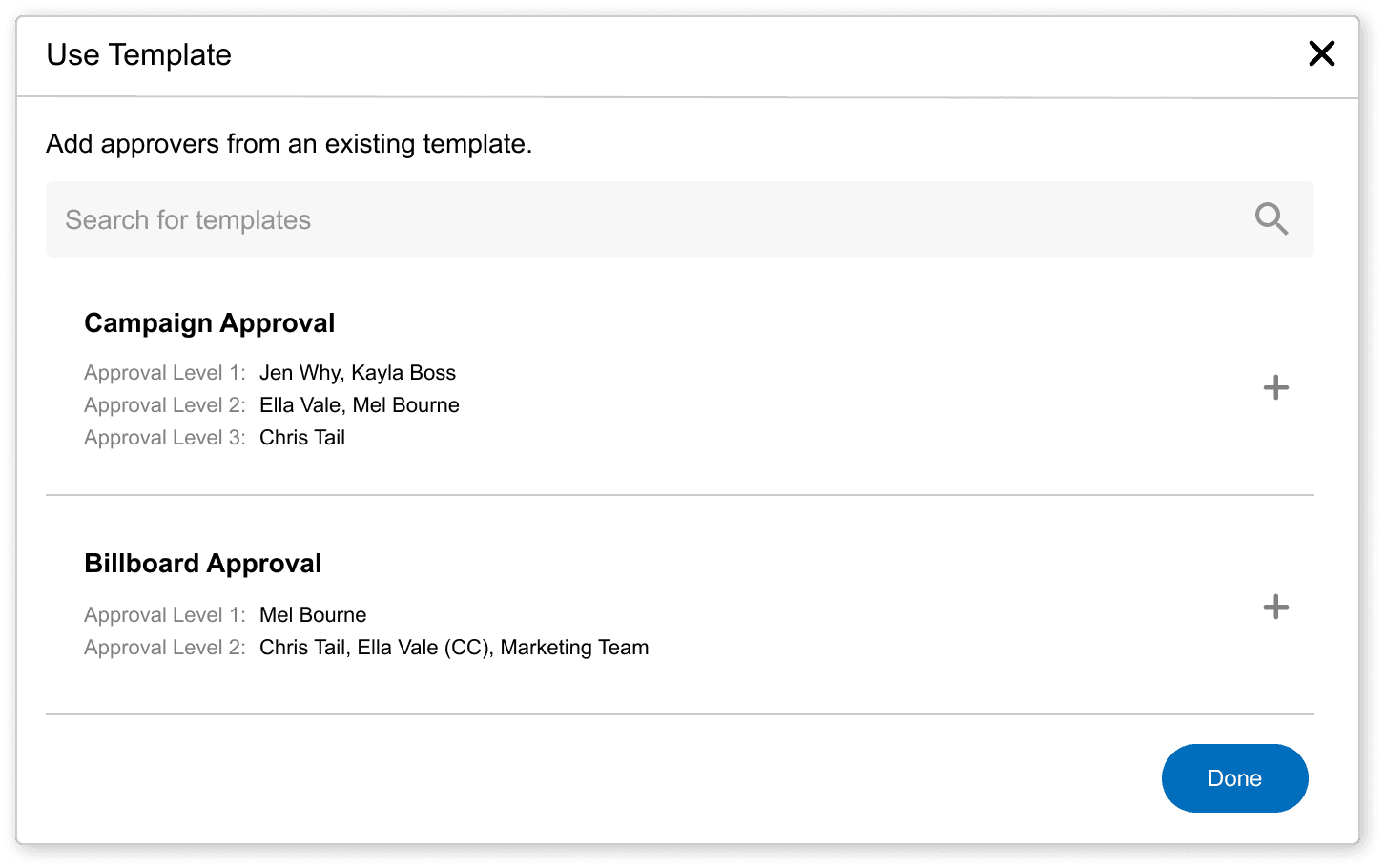
Approval Templates allow teams to pre-define reusable approval routes for different project types, asset types or departments. Each template includes assigned users or groups, tiered approval levels, approval rules and automatic sequencing.
When teams start a new project or upload a new asset, they simply select a template — ensuring the right people receive the work in the correct order, without manual coordination.
Templates also support shared access with external agencies, enabling aligned workflows across internal and external contributors.
Key Features
Reusable Approval Pathway Templates
Create standardised pathways for campaign work, BAU activity, digital content, print materials and regulated assets.

Tiered Sequential Approvals
Define multi-level approval tiers so assets move automatically from one stakeholder group to the next.

Approval Rules for Each Tier
Apply “Anybody Approve” or “Everybody Approve” rules to match your governance and compliance requirements.

User, Group and Department Assignment
Assign individuals or full teams and determine their order within the approval sequence.

Automatic Template Assignment
Automatically apply templates based on project type or asset category.

Manual Template Selection
Let project owners choose a template when sending work for review.

Template Sharing for Agencies
Share approval pathways externally to ensure aligned workflows.

Automated Notifications & Reminders
Reduce bottlenecks and keep work moving using automated reminders.

Version Tracking Integration
Templates connect seamlessly with version management and Audit Trail features.

Central Template Management
Admins can update templates globally so all teams follow the latest approved workflow.

Key Benefits
Stronger Workflow Consistency
Ensure every project follows the correct approval path with no guesswork or manual setup.
Faster Project Initiation
Reusable templates eliminate setup time and let teams start new campaigns immediately.
Improved Compliance and Governance
Structured pathways ensure legal, regulatory and brand checks happen every time.
Reduced Approval Errors
Automatic routing prevents skipped stakeholders or incorrect reviewer sequencing.
Better Alignment with Agencies
Shared templates ensure internal teams and agencies follow one unified process.
Less Admin for Project Owners
Reduce repetitive coordination, setup steps and multi-tier routing tasks.
Greater Visibility and Control
See exactly where work is waiting, who has approved and what comes next.
Reduced Rework and Delays
Consistent routing, clear responsibilities and standardised steps reduce miscommunication.
Enterprise-Ready Structure
Support organisation-wide governance with global templates across departments and regions.
How It Works
- Build the Template
Administrators create a structured approval pathway, defining reviewers, tiers, sequencing rules and governance requirements. - Assign Users, Groups or Departments
Add individuals or full teams and set whether one (“Anybody Approve”) or all (“Everybody Approve”) must approve. - Publish and Share Templates
Make templates available to internal teams and external agencies to ensure aligned, repeatable processes. - Apply Templates Automatically (or Select Manually)
Admation auto-applies the relevant template by project or asset type, or users can select one manually. - Progress Through Approval Tiers
Once a tier approves, the asset flows automatically to the next tier. If changes are requested, it returns to the project owner and re-enters the workflow once revised. - Monitor Progress in Real Time
Teams see outstanding approvals, bottlenecks and status across every level of the workflow. - Update Templates Centrally
Admins adjust templates globally, so all new work follows the latest approved process without manual reconfiguration.
Use Cases
Marketing Teams
Standardise approvals across digital, print, social and brand activity.

Compliance & Legal Teams
Ensure regulated content always follows the required multi-tier review sequence.

Creative Agencies
Align internal and client workflows using shared templates.

Brand Governance Teams
Ensure all content meets brand standards before release.

Enterprise Organisations
Support multiple regions, teams and business units with consistent approval pathways.
Challenges Admation Approval Templates Solve
Routing Variability
Different teams route work in different sequences, causing delays, confusion and unpredictable approval cycles that slow campaign delivery.
Missed Reviewers
Without structured pathways, assets can bypass mandatory legal, brand or compliance reviewers — increasing governance gaps and regulatory exposure.
Workflow Repetition
Teams recreate identical approval steps for each campaign type, adding manual work, inconsistency and unnecessary setup effort.
Manual Setup
Each project requires selecting reviewers one by one, increasing errors, slowing progress and creating bottlenecks during peak periods.
Slow Turnaround
Unstructured approval sequences increase waiting times, create unclear responsibilities and delay campaign delivery across channels.
Compliance Gaps
Regulated industries need reliable, auditable pathways — impossible to achieve at scale with manual, ad-hoc processes.
Agency Misalignment
Agencies follow their own processes, creating inconsistency, miscommunication and delays when workflows aren’t standardised.
Limited Visibility
Teams lack clarity about where approvals are stalled, who needs to act next and how long each stage normally takes.
Cross-Team Inconsistency
Departments, brands and regions all follow different approval methods, reducing governance, weakening brand consistency and slowing collaboration.